介绍
源码为PSD格式,请使用Adobe Photoshop CC 运行
内部字体大家电脑上也不一定有所以大家下载一个 iFonts字体助手
登录后侧边栏有一个字体补齐功能,将PSD文件拖拽进去即可自动补齐字体
源码为PSD格式,请使用Adobe Photoshop CC 运行
内部字体大家电脑上也不一定有所以大家下载一个 iFonts字体助手
登录后侧边栏有一个字体补齐功能,将PSD文件拖拽进去即可自动补齐字体
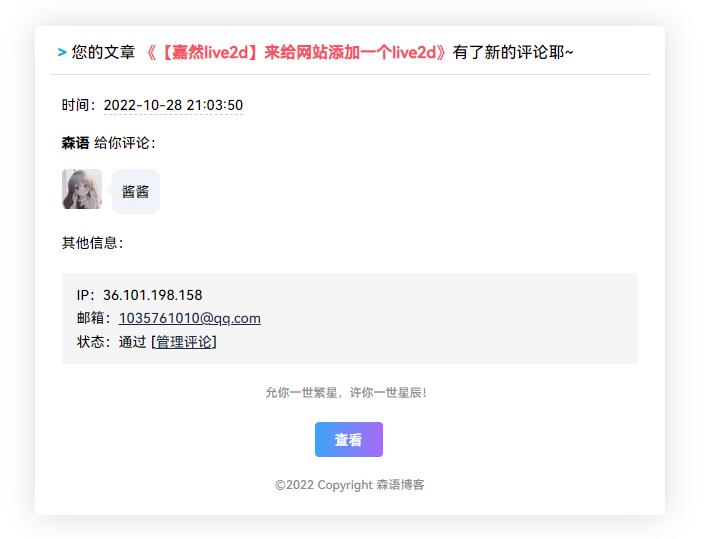
这款CommentToMail样式上十分简洁美观,邮件模板采用气泡对话方式呈现。
[b2_file link=”https://wwu.lanzoum.com/i2Q1Z0eqhd7i” name=”蓝奏云” pass=”” code=””]
给自己的博客添加一个评论邮箱提醒功能大大的节约了读取时间也可以立刻能收的评论的通知,插件自定义程度非常高可以自定义框架,给邮件回复添加更多的趣味性!
安装
1.首先下载插件,下载地址请看文章底部
2.将插件上传到 /usr/plugins/ 这个目录下,并确定插件名字是CommentPush
3.登陆后台,在“控制台”下拉菜单中进入“插件管理”
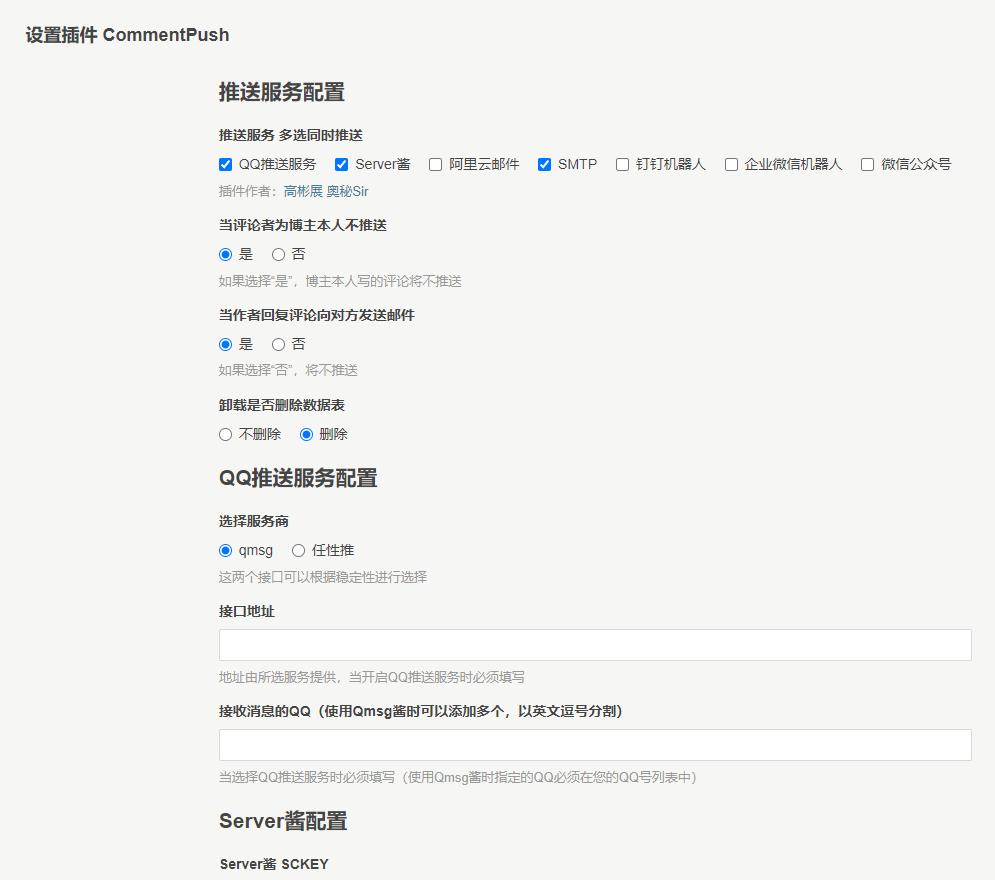
4.启用插件,进行插件设置
设置使用方法
当前插件需要使用file_get_contents函数,有些集成环境会关闭allow_url_fopen,需要把这个设置为On。
支持的推送服务
Server酱,Qmsg酱,阿里云邮件,SMTP邮件,企业微信机器人,钉钉机器人。
推送日志记录
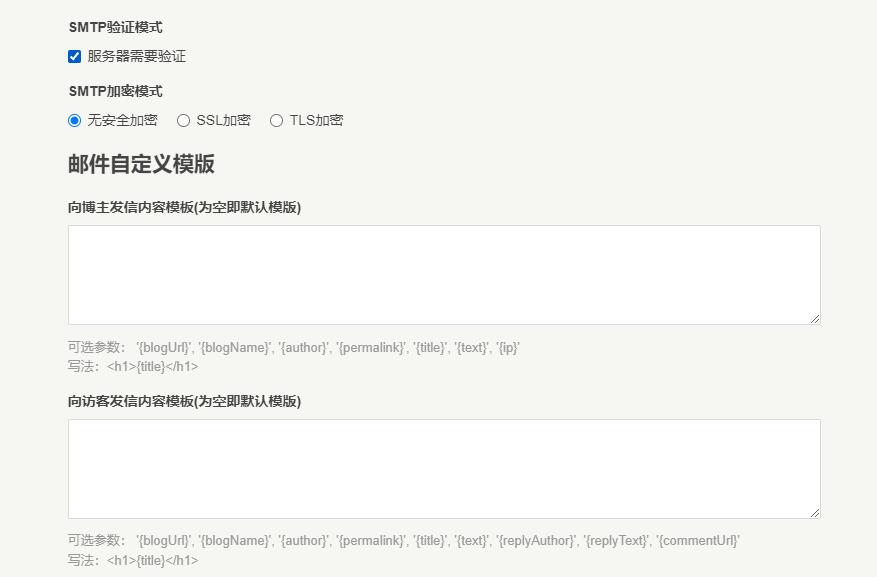
自定义邮件推送模版
数据库适配
支持Pdo_Mysql
支持Pdo_SQLite
提供网络资源分享,建站技术教程,网站源码,写真美图壁纸,动漫美图壁纸,cosplay资源,游戏资源等精品资源。
在为用户提供最好的产品同时,保证优秀的服务质量。
如有任何建设性意见请联系我们提出,邮件联系方式:1035761010@qq.com(请注明来意或直奔主题)
会员制是因为本站的内容来之不易,和本站的建站运营成本问题(包括购买资源、服务器、存储等),因此加入会员服务,会员收入将用来持续运营本站,本人希望能与各位爱好此类的老板共同发展维护。 收集资源不易,且看且珍惜。
站长自费购买资源拿来分享,网上同类网站都是一样的,互相搬运资源(所以可能会有其他同行的广告,无需奇怪),经过对比你可以发现,我们的价格比他低。开通本站会员,相当于有了全网大多数资源。
亲爱的小伙伴们,欢迎加入会员大家庭,本站会员能享受更多的权限,能够免费下载全站资源包括稀有资源。
1、更新及时,每天不限时不限次的滚动更新
2、下载分类清晰,不定期针对网民需求建议调整和开设新分类。
3、每天更新都有详细的说明,提供不同的下载方式,让用户去选择。
都是一群喜欢动漫二次元的小伙伴,专门为二次元爱好者打造的交流平台
因为大环境影响,支付会出现各种问题,基本上24小时内会修复。如果支付成功未到账,充值不了的,请第一时间联系客服。
解压密码在下载页面,具体怎么解压请看 解压教程
由于购买了高配置服务器,和收集资源花费的费用和时间,不得不收取会员赞助费来抵消服务器的成本,网友开通会员的费用均用于网站的正常运转所需的支出,本站为非盈利型网站,为分享型博客。
除作品自带的水印外,无本站任何水印。
本站现在不会增加广告,以后也不会增加广告。每一期的作品都是经过精挑细选的,使网站首页呈现出一种干净的观赏体验。
站点收录的作品都是来源于互联网、正规摄影师、微博 COSER 和摄影机构的作品,经过严格审查筛选,所有内容不含有露D、大CD的、色情内容。拒绝收录违反法律法规的内容。
本站资源全部来自于网络,内容会持续更新,资源都存在百度云盘,会员可获取网盘链接,资源已全部做好备份,不必担心链接失效、网盘被封等问题。不要在网盘内解压,容易失效。如果链接失效,麻烦在文章底部评论“失效”,也可以联系客服,一般24小时内补链接。
邮箱:1035761010@qq.com
QQ:1035761010
微信公众号:森鹿语
今天通过别的资源网了解到森鹿语,这个站点每一个美化都恰到好处,没有像别的站点一样花里胡哨,让人的第一印象十分的舒适,既然来到了这里,那我也留下点什么东西吧,证明这里也是有我的脚印的(●’◡’●)
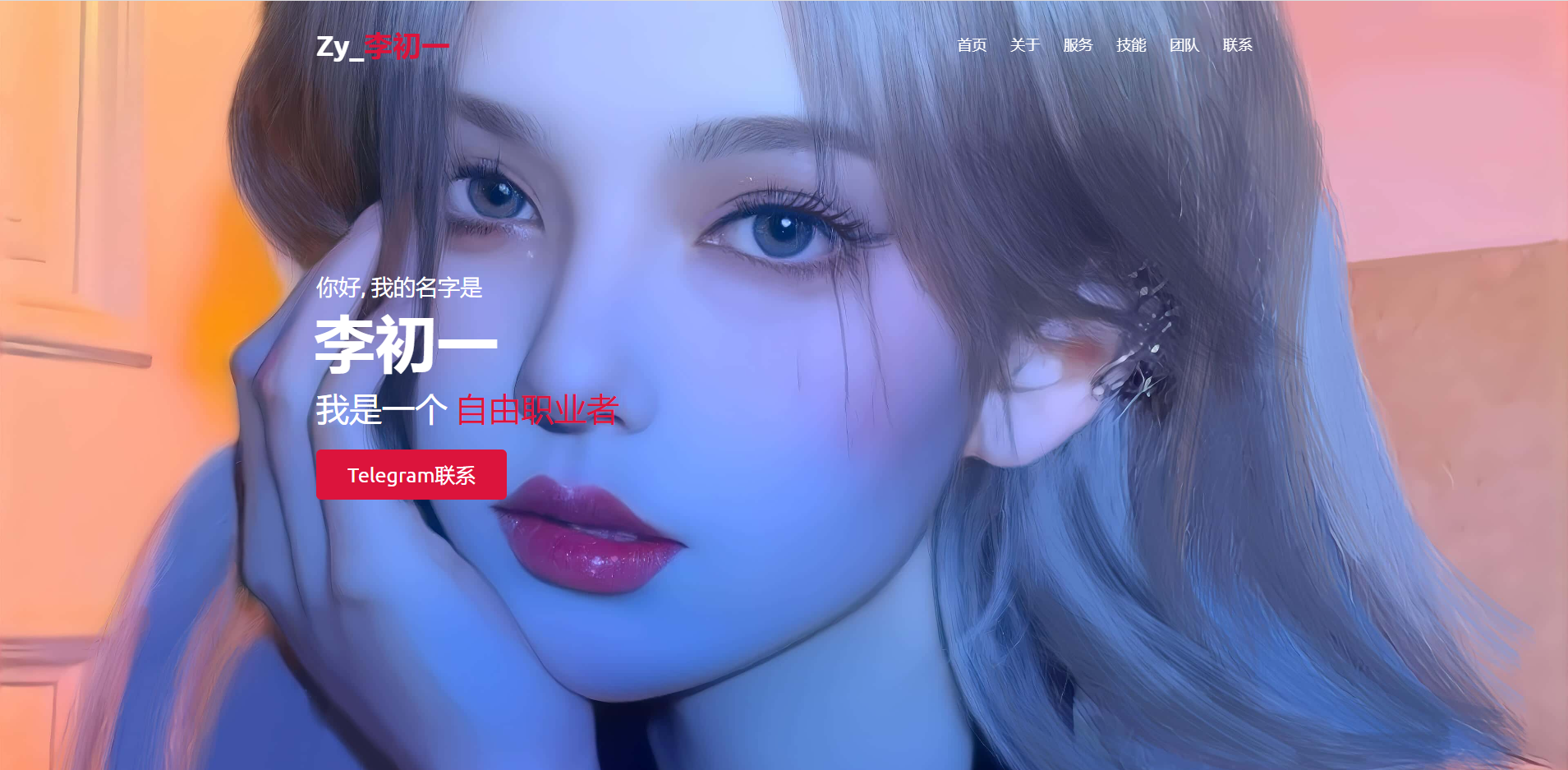
首先我们在我们电脑的桌面创建一个记事本文件,输入下面的代码,并重命名为index.html
<!-- Created By 李初一 -->
<html lang="en">
<head>
    <meta charset="UTF-8">
    <meta name="viewport" content="width=device-width, initial-scale=1.0">
    <title>李初一网络科技工作室</title>
    <link rel="stylesheet" href="style.css">
    <link rel="stylesheet" href="https://cdnjs.cloudflare.com/ajax/libs/font-awesome/5.15.3/css/all.min.css"/>
    <script src="https://code.jquery.com/jquery-3.5.1.min.js"></script>
    <script src="https://cdnjs.cloudflare.com/ajax/libs/typed.js/2.0.11/typed.min.js"></script>
    <script src="https://cdnjs.cloudflare.com/ajax/libs/waypoints/4.0.1/jquery.waypoints.min.js"></script>
    <script src="https://cdnjs.cloudflare.com/ajax/libs/OwlCarousel2/2.3.4/owl.carousel.min.js"></script>
    <link rel="stylesheet" href="https://cdnjs.cloudflare.com/ajax/libs/OwlCarousel2/2.3.4/assets/owl.carousel.min.css"/>
</head>
<body>
    <div class="scroll-up-btn">
        <i class="fas fa-angle-up"></i>
    </div>
    <nav class="navbar">
        <div class="max-width">
            <div class="logo"><a href="https://alacg.cc">Zy_<span>李初一</span></a></div>
            <ul class="menu">
                <li><a href="#home" class="menu-btn">首页</a></li>
                <li><a href="#about" class="menu-btn">关于</a></li>
                <li><a href="#services" class="menu-btn">服务</a></li>
                <li><a href="#skills" class="menu-btn">技能</a></li>
                <li><a href="#teams" class="menu-btn">团队</a></li>
                <li><a href="#contact" class="menu-btn">联系</a></li>
            </ul>
            <div class="menu-btn">
                <i class="fas fa-bars"></i>
            </div>
        </div>
    </nav>

    <!-- home section start -->
    <section class="home" id="home">
        <div class="max-width">
            <div class="home-content">
                <div class="text-1">你好, 我的名字是</div>
                <div class="text-2">李初一</div>
                <div class="text-3">我是一个 <span class="typing"></span></div>
                <a href="https://t.me/Zy_Lcy">Telegram联系</a>
            </div>
        </div>
    </section>

    <!-- about section start -->
    <section class="about" id="about">
        <div class="max-width">
            <h2 class="title">About me</h2>
            <div class="about-content">
                <div class="column left">
                    <img src="img/login.jpg" alt="">
                </div>
                <div class="column right">
                    <div class="text">李初一 Is <span class="typing-2"></span></div>
                    <p>不久前还只是一个失业农民工.现在还只是一只喜欢动漫和文学的学生党.不久以后将是又一个人生迷茫的旅行者.</p>
                    <a href="https://www.zyw.one">前往博客</a>
                </div>
            </div>
        </div>
    </section>

    <!-- services section start -->
    <section class="services" id="services">
        <div class="max-width">
            <h2 class="title">我的专长</h2>
            <div class="serv-content">
                <div class="card">
                    <div class="box">
                        <i class="fas fa-paint-brush"></i>
                        <div class="text">Web 设计</div>
                        <p>极简美学,美化你的站点</p>
                    </div>
                </div>
                <div class="card">
                    <div class="box">
                        <i class="fas fa-chart-line"></i>
                        <div class="text">广告</div>
                        <p>为各大站长提供有效帮助</p>
                    </div>
                </div>
                <div class="card">
                    <div class="box">
                        <i class="fas fa-code"></i>
                        <div class="text">应用程序设计</div>
                        <p>经验丰富,定制属于你的程序</p>
                    </div>
                </div>
               </div>
            </div>
        </div>
    </section>

    <!-- skills section start -->
    <section class="skills" id="skills">
        <div class="max-width">
            <h2 class="title">技能</h2>
            <div class="skills-content">
                <div class="column left">
                    <div class="text">About Skill</div>
                    <p>2019,第一次接触是C/C++,在拥挤的实验室</p>

                    <p>2020,三月份在寝室迷上了网络游戏</p>

                    <p>九月份开始学习到Java</p>

                    <p>2021,年初的时候摸了摸Android,觉得稀奇有趣</p>

                    <p>剩下的月份我在看JavaWeb</p>

                    <p>2022,接触到WordPress,兴趣开始转到前端和脚本语言</p>

                    <p>上半年插科打诨</p>

                    <p>下半年开始学习H5,CSS3,JS</p>

                    <p>现在正在学习前端工程化技术</p>

                    <p>喜欢UI,交互设计,觉得UED是我坚持精确1个像素的动力</p>

                    <p>而未来...</p>

                    <p>想成为一名全栈工程师</p>
                    <a href="https://www.zyw.one">了解更多</a>
                </div>
                <div class="column right">
                    <div class="bars">
                        <div class="info">
                            <span>HTML</span>
                            <span>90%</span>
                        </div>
                        <div class="line html"></div>
                    </div>
                    <div class="bars">
                        <div class="info">
                            <span>CSS</span>
                            <span>60%</span>
                        </div>
                        <div class="line css"></div>
                    </div>
                    <div class="bars">
                        <div class="info">
                            <span>JavaScript</span>
                            <span>80%</span>
                        </div>
                        <div class="line js"></div>
                    </div>
                    <div class="bars">
                        <div class="info">
                            <span>PHP</span>
                            <span>50%</span>
                        </div>
                        <div class="line php"></div>
                    </div>
                    <div class="bars">
                        <div class="info">
                            <span>MySQL</span>
                            <span>70%</span>
                        </div>
                        <div class="line mysql"></div>
                    </div>
                </div>
            </div>
        </div>
    </section>

    <!-- teams section start -->
    <section class="teams" id="teams">
        <div class="max-width">
            <h2 class="title">团队成员</h2>
            <div class="carousel owl-carousel">
                <div class="card">
                    <div class="box">
                        <img src="https://q1.qlogo.cn/g?b=qq&nk=82719519&s=640" alt="">
                        <div class="text">李初一</div>
                        <p>摆烂王</p>
                    </div>
                </div>
                <div class="card">
                    <div class="box">
                        <img src="https://q1.qlogo.cn/g?b=qq&nk=296258507&s=640" alt="">
                        <div class="text">嘉佳</div>
                        <p>神之画饼能手</p>
                    </div>
                </div>
                <div class="card">
                    <div class="box">
                        <img src="https://q1.qlogo.cn/g?b=qq&nk=10001&s=640" alt="">
                        <div class="text">小马哥</div>
                        <p>团队谋划及资金赞助</p>
                    </div>
                </div>
                <div class="card">
                    <div class="box">
                        <img src="https://q1.qlogo.cn/g?b=qq&nk=2968624464&s=640" alt="">
                        <div class="text">爆爆</div>
                        <p>跟我一样帅</p>
                    </div>
                </div>
                <div class="card">
                    <div class="box">
                        <img src="https://q1.qlogo.cn/g?b=qq&nk=1925512109&s=640" alt="">
                        <div class="text">锤子</div>
                        <p>DUANG</p>
                    </div>
                </div>
            </div>
        </div>
    </section>
    <!-- contact section start -->
    <section class="contact" id="contact">
        <div class="max-width">
            <h2 class="title">联系</h2>
            <div class="contact-content">
                <div class="column left">
                    <div class="text">保持联系</div>
                    <p>所以,考虑帮助他会很痛苦。他们的尊严被打破了。谁知道我们生活中没有痛苦的真相?</p>
                    <div class="icons">
                        <div class="row">
                            <i class="fas fa-user"></i>
                            <div class="info">
                                <div class="head">李初一网络科技工作室</div>
                                <div class="sub-title">李初一</div>
                            </div>
                        </div>
                        <div class="row">
                            <i class="fas fa-map-marker-alt"></i>
                            <div class="info">
                                <div class="head">地址</div>
                                <div class="sub-title">湖南, 长沙</div>
                            </div>
                        </div>
                        <div class="row">
                            <i class="fas fa-envelope"></i>
                            <div class="info">
                                <div class="head">Email</div>
                                <div class="sub-title">82719519@qq.com</div>
                            </div>
                        </div>
                    </div>
                </div>
<!-- 这里可以自行引入css代码替换链接为按钮 -->
        <div class="column left">
                    <div class="text">联系方式</div>
                    <p>以下是各种联系方式及途径。推荐Telegram方式进行联系。如果没有及时回复那就是在对抗路</p>
                    <div class="icons">
                        <div class="row">
                            <div class="info">
                                <div class="head">Telegram联系</div><a href="https://t.me/Zy_Lcy">前往Telegram</a>
                            </div>
                        </div>
                        <div class="row">
                            <div class="info">
                                <div class="head">Twitter联系</div><a href="https://Twitter/Zy_Lcy">前往Twitter</a>
                            </div>
                        </div>
                        <div class="row">
                            <div class="info">
                                <div class="head">Facebook联系</div><a href="https://Facebook/Zy_Lcy">前往Facebook</a>
    </section>

    <!-- footer section start -->
    <footer>
        <span>Created By <a href="https://www.zyw.one">李初一网络科技工作室</a> | <span class="far fa-copyright"></span> 2022 All rights reserved.</span>
    </footer>

    <script src="script.js"></script>
</body>
</html>完成这一步之后我们另外再新建一个文件,导入下方代码并重命名为style.css
/*  导入谷歌字体 */@import url('https://fonts.googleapis.com/css2?family=Poppins:wght@400;500;600;700&family=Ubuntu:wght@400;500;700&display=swap');

*{
    margin: 0;
    padding: 0;
    box-sizing: border-box;
    text-decoration: none;
}
html{
    scroll-behavior: smooth;
}

/* custom scroll bar */::-webkit-scrollbar {
    width: 10px;
}
::-webkit-scrollbar-track {
    background: #f1f1f1;
}
::-webkit-scrollbar-thumb {
    background: #888;
}

::-webkit-scrollbar-thumb:hover {
    background: #555;
}

/* 所有类似的内容样式代码 */section{
    padding: 100px 0;
}
.max-width{
    max-width: 1300px;
    padding: 0 80px;
    margin: auto;
}
.about, .services, .skills, .teams, .contact, footer{
    font-family: 'Poppins', sans-serif;
}
.about .about-content,
.services .serv-content,
.skills .skills-content,
.contact .contact-content{
    display: flex;
    flex-wrap: wrap;
    align-items: center;
    justify-content: space-between;
}
section .title{
    position: relative;
    text-align: center;
    font-size: 40px;
    font-weight: 500;
    margin-bottom: 60px;
    padding-bottom: 20px;
    font-family: 'Ubuntu', sans-serif;
}
section .title::before{
    content: "";
    position: absolute;
    bottom: 0px;
    left: 50%;
    width: 180px;
    height: 3px;
    background: #111;
    transform: translateX(-50%);
}
section .title::after{
    position: absolute;
    bottom: -8px;
    left: 50%;
    font-size: 20px;
    color: crimson;
    padding: 0 5px;
    background: #fff;
    transform: translateX(-50%);
}

/* 导航栏样式 */.navbar{
    position: fixed;
    width: 100%;
    z-index: 999;
    padding: 30px 0;
    font-family: 'Ubuntu', sans-serif;
    transition: all 0.3s ease;
}
.navbar.sticky{
    padding: 15px 0;
    background: crimson;
}
.navbar .max-width{
    display: flex;
    align-items: center;
    justify-content: space-between;
}
.navbar .logo a{
    color: #fff;
    font-size: 35px;
    font-weight: 600;
}
.navbar .logo a span{
    color: crimson;
    transition: all 0.3s ease;
}
.navbar.sticky .logo a span{
    color: #fff;
}
.navbar .menu li{
    list-style: none;
    display: inline-block;
}
.navbar .menu li a{
    display: block;
    color: #fff;
    font-size: 18px;
    font-weight: 500;
    margin-left: 25px;
    transition: color 0.3s ease;
}
.navbar .menu li a:hover{
    color: crimson;
}
.navbar.sticky .menu li a:hover{
    color: #fff;
}

/* 菜单btn样式 */.menu-btn{
    color: #fff;
    font-size: 23px;
    cursor: pointer;
    display: none;
}
.scroll-up-btn{
    position: fixed;
    height: 45px;
    width: 42px;
    background: crimson;
    right: 30px;
    bottom: 10px;
    text-align: center;
    line-height: 45px;
    color: #fff;
    z-index: 9999;
    font-size: 30px;
    border-radius: 6px;
    border-bottom-width: 2px;
    cursor: pointer;
    opacity: 0;
    pointer-events: none;
    transition: all 0.3s ease;
}
.scroll-up-btn.show{
    bottom: 30px;
    opacity: 1;
    pointer-events: auto;
}
.scroll-up-btn:hover{
    filter: brightness(90%);
}


/* 主页背景图片 */.home{
    display: flex;
    background: url("img/banner.jpg") no-repeat center;
    height: 100vh;
    color: #fff;
    min-height: 500px;
    background-size: cover;
    background-attachment: fixed;
    font-family: 'Ubuntu', sans-serif;
}
.home .max-width{
  width: 100%;
  display: flex;
}
.home .max-width .row{
  margin-right: 0;
}
.home .home-content .text-1{
    font-size: 27px;
}
.home .home-content .text-2{
    font-size: 75px;
    font-weight: 600;
    margin-left: -3px;
}
.home .home-content .text-3{
    font-size: 40px;
    margin: 5px 0;
}
.home .home-content .text-3 span{
    color: crimson;
    font-weight: 500;
}
.home .home-content a{
    display: inline-block;
    background: crimson;
    color: #fff;
    font-size: 25px;
    padding: 12px 36px;
    margin-top: 20px;
    font-weight: 400;
    border-radius: 6px;
    border: 2px solid crimson;
    transition: all 0.3s ease;
}
.home .home-content a:hover{
    color: crimson;
    background: none;
}

/* 关于页面样式 */.about .title::after{
    content: "who i am";
}
.about .about-content .left{
    width: 45%;
}
.about .about-content .left img{
    height: 400px;
    width: 400px;
    object-fit: cover;
    border-radius: 6px;
}
.about .about-content .right{
    width: 55%;
}
.about .about-content .right .text{
    font-size: 25px;
    font-weight: 600;
    margin-bottom: 10px;
}
.about .about-content .right .text span{
    color: crimson;
}
.about .about-content .right p{
    text-align: justify;
}
.about .about-content .right a{
    display: inline-block;
    background: crimson;
    color: #fff;
    font-size: 20px;
    font-weight: 500;
    padding: 10px 30px;
    margin-top: 20px;
    border-radius: 6px;
    border: 2px solid crimson;
    transition: all 0.3s ease;
}
.about .about-content .right a:hover{
    color: crimson;
    background: none;
}

/* 服务部分样式 */.services, .teams{
    color:#fff;
    background: #111;
}
.services .title::before,
.teams .title::before{
    background: #fff;
}
.services .title::after,
.teams .title::after{
    background: #111;
    content: "what i provide";
}
.services .serv-content .card{
    width: calc(33% - 20px);
    background: #222;
    text-align: center;
    border-radius: 6px;
    padding: 50px 25px;
    cursor: pointer;
    transition: all 0.3s ease;
}
.services .serv-content .card:hover{
    background: crimson;
}
.services .serv-content .card .box{
    transition: all 0.3s ease;
}
.services .serv-content .card:hover .box{
    transform: scale(1.05);
}
.services .serv-content .card i{
    font-size: 50px;
    color: crimson;
    transition: color 0.3s ease;
}
.services .serv-content .card:hover i{
    color: #fff;
}
.services .serv-content .card .text{
    font-size: 25px;
    font-weight: 500;
    margin: 10px 0 7px 0;
}

/* 技能部分样式 */
.skills .title::after{
    content: "what i know";
}
.skills .skills-content .column{
    width: calc(50% - 30px);
}
.skills .skills-content .left .text{
    font-size: 20px;
    font-weight: 600;
    margin-bottom: 10px;
}
.skills .skills-content .left p{
    text-align: justify;
}
.skills .skills-content .left a{
    display: inline-block;
    background: crimson;
    color: #fff;
    font-size: 18px;
    font-weight: 500;
    padding: 8px 16px;
    margin-top: 20px;
    border-radius: 6px;
    border: 2px solid crimson;
    transition: all 0.3s ease;
}
.skills .skills-content .left a:hover{
    color: crimson;
    background: none;
}
.skills .skills-content .right .bars{
    margin-bottom: 15px;
}
.skills .skills-content .right .info{
    display: flex;
    margin-bottom: 5px;
    align-items: center;
    justify-content: space-between;
}
.skills .skills-content .right span{
    font-weight: 500;
    font-size: 18px;
}
.skills .skills-content .right .line{
    height: 5px;
    width: 100%;
    background: lightgrey;
    position: relative;
}
.skills .skills-content .right .line::before{
    content: "";
    position: absolute;
    height: 100%;
    left: 0;
    top: 0;
    background: crimson;
}
.skills-content .right .html::before{
    width: 90%;
}
.skills-content .right .css::before{
    width: 60%;
}
.skills-content .right .js::before{
    width: 80%;
}
.skills-content .right .php::before{
    width: 50%;
}
.skills-content .right .mysql::before{
    width: 70%;
}

/* 团队部分样式 */.teams .title::after{
    content: "who with me";
}
.teams .carousel .card{
    background: #222;
    border-radius: 6px;
    padding: 25px 35px;
    text-align: center;
    overflow: hidden;
    transition: all 0.3s ease;
}
.teams .carousel .card:hover{
    background: crimson;
}
.teams .carousel .card .box{
    display: flex;
    flex-direction: column;
    align-items: center;
    justify-content: center;
    transition: all 0.3s ease;
}
.teams .carousel .card:hover .box{
    transform: scale(1.05);
}
.teams .carousel .card .text{
    font-size: 25px;
    font-weight: 500;
    margin: 10px 0 7px 0;
}
.teams .carousel .card img{
    height: 150px;
    width: 150px;
    object-fit: cover;
    border-radius: 50%;
    border: 5px solid crimson;
    transition: all 0.3s ease;
}
.teams .carousel .card:hover img{
    border-color: #fff;
}
.owl-dots{
    text-align: center;
    margin-top: 20px;
}
.owl-dot{
    height: 13px;
    width: 13px;
    margin: 0 5px;
    outline: none!important;
    border-radius: 50%;
    border: 2px solid crimson!important;
    transition: all 0.3s ease;
}
.owl-dot.active{
    width: 35px;
    border-radius: 14px;
}
.owl-dot.active,
.owl-dot:hover{
    background: crimson!important;
}

/* 联系界面样式 */.contact .title::after{
    content: "get in touch";
}
.contact .contact-content .column{
    width: calc(50% - 30px);
}
.contact .contact-content .text{
    font-size: 20px;
    font-weight: 600;
    margin-bottom: 10px;
}
.contact .contact-content .left p{
    text-align: justify;
}
.contact .contact-content .left .icons{
    margin: 10px 0;
}
.contact .contact-content .row{
    display: flex;
    height: 65px;
    align-items: center;
}
.contact .contact-content .row .info{
    margin-left: 30px;
}
.contact .contact-content .row i{
    font-size: 25px;
    color: crimson;
}
.contact .contact-content .info .head{
    font-weight: 500;
}
.contact .contact-content .info .sub-title{
    color: #333;
}
.contact .right form .fields{
    display: flex;
}
.contact .right form .field,
.contact .right form .fields .field{
    height: 45px;
    width: 100%;
    margin-bottom: 15px;
}
.contact .right form .textarea{
    height: 80px;
    width: 100%;
}
.contact .right form .name{
    margin-right: 10px;
}
.contact .right form .field input,
.contact .right form .textarea textarea{
    height: 100%;
    width: 100%;
    border: 1px solid lightgrey;
    border-radius: 6px;
    outline: none;
    padding: 0 15px;
    font-size: 17px;
    font-family: 'Poppins', sans-serif;
    transition: all 0.3s ease;
}
.contact .right form .field input:focus,
.contact .right form .textarea textarea:focus{
    border-color: #b3b3b3;
}
.contact .right form .textarea textarea{
  padding-top: 10px;
  resize: none;
}
.contact .right form .button-area{
  display: flex;
  align-items: center;
}
.right form .button-area button{
  color: #fff;
  display: block;
  width: 160px!important;
  height: 45px;
  outline: none;
  font-size: 18px;
  font-weight: 500;
  border-radius: 6px;
  cursor: pointer;
  flex-wrap: nowrap;
  background: crimson;
  border: 2px solid crimson;
  transition: all 0.3s ease;
}
.right form .button-area button:hover{
  color: crimson;
  background: none;
}
/* 页脚部分样式 */footer{
    background: #111;
    padding: 15px 23px;
    color: #fff;
    text-align: center;
}
footer span a{
    color: crimson;
    text-decoration: none;
}
footer span a:hover{
    text-decoration: underline;
}


/* 响应媒体查询启动 */@media (max-width: 1104px) {
    .about .about-content .left img{
        height: 350px;
        width: 350px;
    }
}

@media (max-width: 991px) {
    .max-width{
        padding: 0 50px;
    }
}
@media (max-width: 947px){
    .menu-btn{
        display: block;
        z-index: 999;
    }
    .menu-btn i.active:before{
        content: "\f00d";
    }
    .navbar .menu{
        position: fixed;
        height: 100vh;
        width: 100%;
        left: -100%;
        top: 0;
        background: #111;
        text-align: center;
        padding-top: 80px;
        transition: all 0.3s ease;
    }
    .navbar .menu.active{
        left: 0;
    }
    .navbar .menu li{
        display: block;
    }
    .navbar .menu li a{
        display: inline-block;
        margin: 20px 0;
        font-size: 25px;
    }
    .home .home-content .text-2{
        font-size: 70px;
    }
    .home .home-content .text-3{
        font-size: 35px;
    }
    .home .home-content a{
        font-size: 23px;
        padding: 10px 30px;
    }
    .max-width{
        max-width: 930px;
    }
    .about .about-content .column{
        width: 100%;
    }
    .about .about-content .left{
        display: flex;
        justify-content: center;
        margin: 0 auto 60px;
    }
    .about .about-content .right{
        flex: 100%;
    }
    .services .serv-content .card{
        width: calc(50% - 10px);
        margin-bottom: 20px;
    }
    .skills .skills-content .column,
    .contact .contact-content .column{
        width: 100%;
        margin-bottom: 35px;
    }
}

@media (max-width: 690px) {
    .max-width{
        padding: 0 23px;
    }
    .home .home-content .text-2{
        font-size: 60px;
    }
    .home .home-content .text-3{
        font-size: 32px;
    }
    .home .home-content a{
        font-size: 20px;
    }
    .services .serv-content .card{
        width: 100%;
    }
}

@media (max-width: 500px) {
    .home .home-content .text-2{
        font-size: 50px;
    }
    .home .home-content .text-3{
        font-size: 27px;
    }
    .about .about-content .right .text,
    .skills .skills-content .left .text{
        font-size: 19px;
    }
    .contact .right form .fields{
        flex-direction: column;
    }
    .contact .right form .name,
    .contact .right form .email{
        margin: 0;
    }
    .right form .error-box{
       width: 150px;
    }
    .scroll-up-btn{
        right: 15px;
        bottom: 15px;
        height: 38px;
        width: 35px;
        font-size: 23px;
        line-height: 38px;
    }
}完成这一步之后我们还需要一个JS文件,新建一个记事本文件导入下方代码并重命名为script.js
$(document).ready(function(){
    $(window).scroll(function(){
        // sticky navbar on scroll script
        if(this.scrollY > 20){
            $('.navbar').addClass("sticky");
        }else{
            $('.navbar').removeClass("sticky");
        }

        // scroll-up button show/hide script
        if(this.scrollY > 500){
            $('.scroll-up-btn').addClass("show");
        }else{
            $('.scroll-up-btn').removeClass("show");
        }
    });

    // slide-up script
    $('.scroll-up-btn').click(function(){
        $('html').animate({scrollTop: 0});
        // removing smooth scroll on slide-up button click
        $('html').css("scrollBehavior", "auto");
    });

    $('.navbar .menu li a').click(function(){
        // applying again smooth scroll on menu items click
        $('html').css("scrollBehavior", "smooth");
    });

    // toggle menu/navbar script
    $('.menu-btn').click(function(){
        $('.navbar .menu').toggleClass("active");
        $('.menu-btn i').toggleClass("active");
    });

    // typing text animation script
    var typed = new Typed(".typing", {
        strings: ["网络博主", "开发者", "博客主", "设计师", "自由职业者"],
        typeSpeed: 100,
        backSpeed: 60,
        loop: true
    });

    var typed = new Typed(".typing-2", {
        strings: ["网络博主", "开发者", "博客主", "设计师", "自由职业者"],
        typeSpeed: 100,
        backSpeed: 60,
        loop: true
    });

    // owl carousel script
    $('.carousel').owlCarousel({
        margin: 20,
        loop: true,
        autoplay: true,
        autoplayTimeOut: 2000,
        autoplayHoverPause: true,
        responsive: {
            0:{
                items: 1,
                nav: false
            },
            600:{
                items: 2,
                nav: false
            },
            1000:{
                items: 3,
                nav: false
            }
        }
    });
});保存三个文件之后在你的桌面点击index.html文件就成功拥有了一款完全属于你自己的个人主页
这时候你会遇到以下几个问题:
1:背景图缺失
2:个人介绍头像图缺失
3:团队介绍里如何更改团队成员头像
4:首页文字跳动如何更换
5:源代码有没有安全隐患
我答:背景图及个人介绍位置的图片缺失是因为代码里使用的是本地文件,你所创建的代码本地并没有相应的文件名所调用,所以你需要创建一个文件夹并命名为img导入背景图及头像,背景图命名为banner.jpg,头像命名为login.jpg
关于团队介绍一栏的头像,原版是调用本地文件,但是我为了方便小白我把图片更改为外链模式,这里我放置的是QQ头像的链接,大家仅需更改QQ号即可
首页跳动文字在JS文件里修改,你只需更改中文或按照示例样式添加文字即可,代码无任何安全隐患,所有源代码都在上面
如果你要修改配色方案请修改CSS文件里color后面的颜色代码,当然其他的也是支持修改的,非常的简单,对于新手非常的友好
如果大家有不错的美化想法并成功实施可以在评论区交作业,欢迎大家使用本源代码以及对代码做出美化和修改
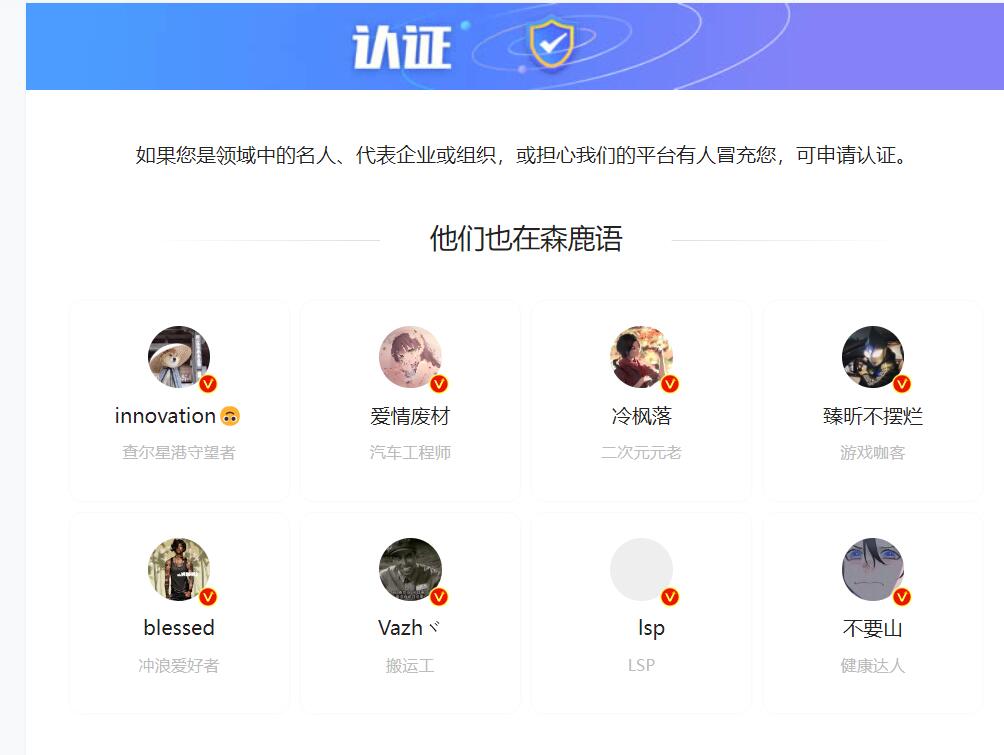
define('B2_VERIFY_ICON','<i class="b2-vrenzhengguanli b2font b2-color"></i>');
//把b2-vrenzhengguanli修改为vrnzhengss
<span v-if="userData.user_title">'.b2_get_icon('b2-vrenzhengguanli').'</span>
//把b2-vrenzhengguanli修改为vrnzhengss
.vrnzhengss{
    position: absolute;
    background-image: url(/gold.svg);
    background-repeat: no-repeat;
    background-size: 100% auto;
    -webkit-animation: woo-icon-wooSprite 2.1s steps(15) infinite backwards;
}
.user-verify .vrnzhengss{
    position: initial;
    margin-bottom: -6px;
    display: inline-block;
    width: 23px;
    height: 23px;
}
.top-user-avatar .vrnzhengss{
    bottom: -5px;
    right: -6px;
    width: 16px;
    height: 16px;
}
.verify-box-avatar .vrnzhengss,.user-w-avatar .vrnzhengss,.gold-top-avatar .vrnzhengss,.mission-page-user-verify .vrnzhengss,.post-meta-left .avatar-parent .vrnzhengss,.topic-avatar .vrnzhengss{
    bottom: -5px;
    right: -6px;
    width: 20px;
    height: 20px;
}
.w-a-info .vrnzhengss{
    bottom: -5px;
    right: 200px;
    width: 20px;
    height: 20px;
}
@media (min-width:800px) {
.user-verify .vrnzhengss{
    position: initial;
    margin-bottom: -6px;
    display: inline-block;
    width: 23px;
    height: 23px;
}
.top-user-avatar .vrnzhengss,.verify-box-avatar .vrnzhengss,.user-w-avatar .vrnzhengss,.gold-top-avatar .vrnzhengss,.mission-page-user-verify .vrnzhengss,.post-meta-left .avatar-parent .vrnzhengss,.topic-avatar .vrnzhengss{
    bottom: -5px;
    right: -6px;
    width: 16px;
    height: 16px;
}
.w-a-info .vrnzhengss{
    bottom: -5px;
    right: 200px;
    width: 20px;
    height: 20px;
}
}
@-webkit-keyframes woo-icon-wooSprite {
    0% {
        background-position: 0 0;
    }
    to {
        background-position: 0 bottom;
    }
}
@keyframes woo-icon-wooSprite {
    0% {
        background-position: 0 0;
    }
    to {
        background-position: 0 bottom;
    }
}

<!-- 首页N格区块html代码 开始 -->
<div id="home-row-qukuai" class="  home_row home_row_1  module-qukuai  " style="background-color:;">
   <div class="wrapper">
        <div class="home-row-left content-area ">
            <div class="sort b2-radius" style="margin-top:-100px ;">
                <ul class="sort-config">
                    <li>
                                            <div class="sort-config-item">
                                            <img class="sort-config-icon" src="https://www.guidebook.top/images/logo.svg" alt="" />
                                            <a href="https://nav.guidebook.top" target="_blank"><p class="sort-config-title">数字指南手册
                                            <span class="go" style="background-color: #ff6000;">GO<i class="b2font b2-arrow-right-s-line"></i></span>
                                            </p> </a>
                                            <span class="sort-config-desc">高效工作学习生活手册</span>
                                            </div></li> <li>
                                            <div class="sort-config-item">
                                            <img class="sort-config-icon" src="https://www.guidebook.top/images/search.svg" alt="" />
                                            <a href="https://search.guidebook.top" target="_blank"><p class="sort-config-title">搜索指南
                                            <span class="go" style="background-color: #5de000;">GO<i class="b2font b2-arrow-right-s-line"></i></span>
                                            </p> </a>
                                            <span class="sort-config-desc">聚合搜索引擎</span>
                                            </div></li> <li>
                                            <div class="sort-config-item">
                                            <img class="sort-config-icon" src="https://www.guidebook.top/images/danghui.svg" alt="" />
                                            <a href="https://www.guidebook.top" target="_blank"><p class="sort-config-title">公文写作
                                            <span class="go" style="background-color: #ff6000;">GO<i class="b2font b2-arrow-right-s-line"></i></span>
                                            </p> </a>
                                            <span class="sort-config-desc">写作素材收集</span>
                                            </div></li> <li>
                                            <div class="sort-config-item">
                                            <img class="sort-config-icon" src="https://www.guidebook.top/images/news.svg" alt="" />
                                            <a href="https://nav.guidebook.top/hotnews/" target="_blank"><p class="sort-config-title">今日资讯
                                            <span class="go" style="background-color: #ff6000;">GO<i class="b2font b2-arrow-right-s-line"></i></span>
                                            </p> </a>
                                            <span class="sort-config-desc">每日新闻速递</span>
                                            </div></li> <li>
                                            <div class="sort-config-item">
                                            <img class="sort-config-icon" src="https://www.guidebook.top/images/hezuoanli.svg" alt="" />
                                            <a href="/requests" target="_blank"><p class="sort-config-title">项目库
                                            <span class="go" style="background-color: #ff6000;">GO<i class="b2font b2-arrow-right-s-line"></i></span>
                                            </p> </a>
                                            <span class="sort-config-desc">优秀项目列表</span>
                                            </div></li>                 </ul>
                                            <div class="sort-blocks">
                    <div class="bt-body">
                        <div class="containerrr">
                            <div class="onecad-quk-carousel">
                                <div class="itemss">
                                    <a class="card_ZQsT- b2-radius" href="https://www.guidebook.top/337/" target="_blank">
                                                                        <img src="https://www.guidebook.top/images/shetuwang.png">


                                                                    </a><a class="card_ZQsT- b2-radius" href="http://nav.guidebook.top" target="_blank">
                                                                        <img src="https://www.guidebook.top/images/wxgzh1.png">

                                                                    </a>

<a class="card_ZQsT- b2-radius" href="https://nav.guidebook.top" target="_blank">
                                                                        <img src="https://www.guidebook.top/images/101.jpg">
                                                                       </a>
                                                                                                 </div>
                            </div>
                        </div>
                    </div>
                    <div class="srot-mine b2-radius">
                      <div class="wwads-cn wwads-horizontal" data-id="147" style="width:376px; height:180px;flex-wrap:nowrap;margin-top:0px;background-color:azure;padding:0px;"></div>

                    </div>
                </div>
                            </div>
        </div>
    </div>
</div>
<!-- 首页N格区块html代码 开始 -->
/*首页N格样式代码开始*//*角标CSS*/.jiaobiao_color1{
    color:#fff;
    background-color:#03bbff;
}
.jiaobiao_color2{
    color:#fff;
    background-color:#ca26ff;
}
.jiaobiao_color3{
    color:#fff;
    background-color:#7bdcb5;
}
.jiaobiao_color4{
    color:#fff;
    background-color:#ff2a8e;
}
.jiaobiao_color5{
    color:#fff;
    background-color:#ff8f21;
}
.jiaobiao_color6{
    color:#fff;
    background-color:#10e396;
}
.tipss,.meta-post-type {
position: absolute;
    top: 0px;
    right: -64px;
    z-index: 1;
    width: 150px;
    height: 22px;
    color: #fff;
    line-height: 25px;
    -webkit-transform: rotate(45deg);
    transform: rotate(45deg);
    text-align: center;
    font-size: 12px;
}
.yellow {
    background-color: var(--b2color);
}
.sort {
    position: relative;
    z-index: 3;
    padding: 26px;
    background: #fff;
    /* border: 1px solid #797c80; */    /* -webkit-box-shadow: 0 40px 75px 0 rgba(57,60,67,.08); */    /* box-shadow: 0 40px 75px 0 rgba(57,60,67,.08); */    -webkit-backdrop-filter: blur(10px);
    backdrop-filter: blur(10px);
}
.sort-config {
    display: -webkit-box;
    display: -ms-flexbox;
    display: flex;
    -webkit-box-pack: justify;
    -ms-flex-pack: justify;
    justify-content: space-between;
}
.main {
    width: 1410px;
    margin: 0 auto;
    padding-bottom: 40px;
}
.sort-config>li {
    -webkit-box-flex: 1;
    -ms-flex: 1;
    flex: 1;
    overflow: hidden;
    height: 100%;
}
.ibanner-tips-float {
    position: absolute;
    top: -70px;
    left: 1096px;
    z-index: 24;
}
.sort-config-item {
    display: block;
    height: 100%;
}
.sort-config-item img {
    float: left;
    width: 62px;
    height: 62px;
    margin-right: 12px;
}
.sort-config-title {
    line-height: 34px;
    font-size: 18px;
    font-weight: 600;
    color: #2d2d2d;
    -webkit-transition: .3s;
    transition: .3s;
}
.sort-config-desc {
    float: left;
    line-height: 22px;
    font-size: 14px;
    color: #8e8e8e;
}
.sort-blocks {
    display: -webkit-box;
    display: -ms-flexbox;
    display: flex;
    -webkit-box-pack: justify;
    -ms-flex-pack: justify;
    justify-content: space-between;
    height: 100%;
    margin-top: 35px;
}
.sort-blocks-item {
    position: relative;
    overflow: hidden;
    width: 214px;
    height: 100%;
    background: #f7f9fa;
    border-radius: 14px;
}
.sort-blocks-item .blocks-item-wrap {
    -webkit-transition: .3s;
    transition: .3s;
    -webkit-filter: none;
    filter: none;
}
.sort-blocks-icon {
    display: block;
    width: 60px;
    height: 47px;
    margin: 18px auto 15px;
    background-repeat: no-repeat;
    background-size: cover;
}
.sort-blocks-title {
    line-height: 22px;
    font-size: 22px;
    font-weight: 600;
    color: #2d2d2d;
    letter-spacing: 1px;
    text-align: center;
}
.sort-mine-wrap img {
    display: flex;
    width: auto;
}
.sort-config-title .go {
    border-radius: 4px;
    color: #ffffff;
    font-size: 13px;
    -webkit-transform: scale(.9);
    -ms-transform: scale(.9);
    transform: scale(.9);
    font-weight: normal;
    padding: 2px 5px;
    position: absolute;
    line-height: 15px;
    margin-left: 5px;
    cursor: pointer;
    text-transform: uppercase;
    vertical-align: middle;
    margin-top: 7px;
}
.sort-blocks-item .blocks-hover, .sort-blocks-item .blocks-hover-title {
    position: absolute;
    top: 0;
    width: 100%;
    color: #fff;
    text-align: center;
    line-height: 22px;
}
.sort-blocks-item .blocks-hover {
    left: 0;
    height: 100%;
    padding-top: 22px;
    font-size: 14px;
    background: rgba(0,0,0,.4);
    -webkit-transition: .3s;
    transition: .3s;
    opacity: 0;
}
.sort-blocks-item .blocks-hover-tit {
    line-height: 18px;
    font-size: 18px;
}
.sort-blocks-item .blocks-hover-line {
    width: 158px;
    height: 1px;
    margin: 12px auto 8px;
    background: -webkit-gradient(linear,left top,right top,from(hsla(0,0%,100%,0)),color-stop(30%,hsla(0,0%,100%,.7)),color-stop(70%,hsla(0,0%,100%,.7)),to(hsla(0,0%,100%,.1)));
    background: linear-gradient(90deg,hsla(0,0%,100%,0),hsla(0,0%,100%,.7) 30%,hsla(0,0%,100%,.7) 70%,hsla(0,0%,100%,.1));
}
.srot-mine {
    position: relative;
    width: 376px;
    background: -webkit-gradient(linear,left top,right top,from(#fdf8eb),to(#feeec3));
    background: linear-gradient(90deg,#fdf8eb,#feeec3);
    height: 180px;
    box-shadow: 0 2px 5px 0 rgb(0 0 0 / 4%);
}
.srot-mine-bg {
    position: absolute;
    top: 13px;
    right: -13px;
    width: 118px;
    height: 78px;
    background: url(./Center/Assets/images/sort_zuanshi.png) no-repeat;
    background-size: cover;
}
.sort-mine-wrap {
    position: absolute;
    left: 0;
    top: 0;
    z-index: 1;
    width: 100%;
    height: 100%;
    padding: 12px 16px 15px;
}
.srot-mine-tit {
    display: -webkit-box;
    display: -ms-flexbox;
    display: flex;
    line-height: 25px;
}
.srot-mine-ava {
    width: 20px;
    height: 20px;
    border-radius: 50%;
}
.srot-mine-tit>span {
    margin-left: 9px;
    font-size: 15px;
    font-weight: 600;
    color: #613c14;
}
.srot-mine-vips {
    display: flex;
    -webkit-box-pack: justify;
    justify-content: space-between;
    width: 337px;
    margin: 15px 0px 5px;
}
.sort-vips-item {
    display: block;
    -webkit-box-flex: 1;
    -ms-flex: 1;
    flex: 1;
    text-align: center;
}
.sort-vips-icon {
    display: block;
    width: 32px;
    height: 36px;
    margin: 0 auto;
    -webkit-transition: .3s;
    transition: .3s;
    margin-left: 30px;
}
.sort-vips-tit {
    margin: 15px 0px;
    line-height: 12px;
    font-size: 13px;
    color: #613c14;
    margin-left: 10px;
}
.sort-vips-tit2-kt {
    margin-top: 10px;
    line-height: 12px;
    display: flex;
    justify-content: center;
    align-items: center;
    height: 25px;
    color: #ffffff;
    border-radius: 33px;
    margin-right: 10px;
    font-size: 14px;
    background-image: linear-gradient(90deg,#ffc046,#ff7d04);
    margin: 10px 0px 0px 9px;
}
.sort-vips-tit2-wk {
    margin-top: 10px;
    line-height: 12px;
    display: flex;
    justify-content: center;
    align-items: center;
    height: 25px;
    color: #ffffff;
    border-radius: 33px;
    margin-right: 10px;
    font-size: 14px;
    opacity: 0.5;
    background: linear-gradient(to bottom, #323232 0%, #3F3F3F 40%, #1C1C1C 150%), linear-gradient(to top, rgba(255,255,255,0.40) 0%, rgba(0,0,0,0.25) 200%); background-blend-mode: multiply;
    margin: 10px 0px 0px 9px;
}
.bt-body {
    padding-bottom: 0px;
    background: transparent;
    width: calc(100% - 376px);
}
.b-boxs .video .s-pic{height: 189px;}
.b-boxs .video .video-view {height: 186px;width: 337px; overflow: hidden; cursor: pointer;display: block;}
.b-boxs .video:hover .video-view .img-none{display: none;}
.b-boxs .video .video-view video{width: 337px;}
.b-boxs .video:hover .video-view video{display: block;}
.b-boxs .video .mark{height: 189px; display: none;}
.b-boxs .video:hover .mark{display: none;}
.b-boxs .video .v-down{
    position: absolute;
    top: 12px;
    left: 57%;
    z-index: 2;
    margin-left: 65px;
    padding-left: 21px;
    width: 45px;
    height: 31px;
    border-radius: 2px;
    background: url(./Center/Assets/images/video.png) -8px -77px no-repeat #007aff;
    color: #fff;
    font-size: 20px;
    font-size: 14px;
    line-height: 31px;
    opacity: 0;
    cursor: pointer;
    -moz-opacity: 0;
    -khtml-opacity: 0;
}
.b-boxs .video .v-down:hover {
    background: url() -5px -77px no-repeat #6e91e6;
}
.b-boxs .video .v-collect{
    width: 31px;
    height: 31px;
    line-height: 31px;
    position: absolute;
    left: 58%;
    top: 12px;
    margin-left: 23px;
    color: #333;
    font-size: 20px;
    border-radius: 2px;
    z-index: 2;
    background: url(./Center/Assets/images/video.png) -11px 5px no-repeat #fff;
    padding-left: 0px;
    cursor: pointer;
    filter: alpha(opacity=0);
    ilter: alpha(opacity=0);
    -moz-opacity: 0;
    -khtml-opacity: 0;
    opacity: 0;
    font-size: 17px;
    letter-spacing: 7px;
}
.b-boxs .video:hover .v-collect,.b-boxs .video:hover .v-down{
    filter: alpha(opacity=1);
    ilter: alpha(opacity=1);
    -moz-opacity: 1;
    -khtml-opacity: 1;
    opacity: 1;
}
.b-boxs .video .chosed{
    background: url(./Center/Assets/images/video.png) -11px -36px no-repeat #fff;
}
.b-boxs .video .title {
    position: absolute;
    bottom: 0px;
    left: 0px;
    width: 316px;
    height: 30px;
    line-height: 30px;
    color: #ffffff;
    text-align: left;
    z-index: 1;
    overflow: hidden;
    white-space: nowrap;
    -o-text-overflow: ellipsis;
    text-overflow: ellipsis;
    font-size: 12px;
    background: #00000075;
    background-color: #1677ff00;
    background-image: linear-gradient(-90deg, #00000000, #000000);
}
.b-box .audio-box {
    width: 340px;
    height: 160px;
    float: left;
    margin-right: 16px;
    margin-bottom: 16px;
    margin-top: 0px;
    position: relative;
    overflow: hidden;
    box-shadow: 0 0px 9px rgba(0,0,0,.1);
    background: #ffffff;
    box-shadow: 0 4px 10px rgba(0,0,0,0.1);
    border-radius: 10px;
}
.b-boxs .video:hover  .video-bq,.b-boxs .video:hover .title{
    display: none;
}
.b-boxs .video:hover .mc-bottom{
    display:none;
}
.b-boxs .video .mc-bottom{
    display: inline-block;
    position: absolute;
    width: 100%;
    height: 32%;
    left: 0;
    bottom: 0;
    background: #000;
    opacity: .4 \9 \0;
    background: -moz-linear-gradient(bottom, rgba(0, 0, 0, .4) 0, transparent 100%);
    background: -webkit-gradient(linear, bottom, top, color-stop(0, rgba(0, 0, 0, .4)), color-stop(100%, transparent));
    background: -webkit-linear-gradient(bottom, rgba(0, 0, 0, .4) 0, transparent 100%);
    background: -o-linear-gradient(bottom, rgba(0, 0, 0, .4) 0, transparent 100%);
    background: -ms-linear-gradient(bottom, rgba(0, 0, 0, .4) 0, transparent 100%);
    background: -webkit-gradient(linear, left bottom, left top, from(rgba(0, 0, 0, .4)), to(transparent));
    background: -webkit-gradient(linear, left bottom, left top, color-stop(0, rgba(0, 0, 0, .4)), to(transparent));
    background: -webkit-gradient(linear, left bottom, left top, color-stop(0, rgba(0, 0, 0, .4)), to(transparent));
    background: -webkit-gradient(linear, left bottom, left top, color-stop(0, rgba(0, 0, 0, .4)), to(transparent));
    background: -webkit-gradient(linear, left bottom, left top, color-stop(0, rgba(0, 0, 0, .4)), to(transparent));
    background: linear-gradient(to top, rgba(0, 0, 0, .4) 0, transparent 100%);
    filter: progid:DXImageTransform.Microsoft.gradient(GradientType=0, startColorstr=#000000, endColorstr=#ffffff);
    -ms-filter: "progid:DXImageTransform.Microsoft.gradient (GradientType=0, startColorstr=#000000, endColorstr=#ffffff)";
}
.good-ppt {
    width: 100%;
}
.topic-title {
    height: 41px;
    color: #484747;
    text-align: left;
}
.wlimits {
    margin-right: -59px;
}
.topic-title .jptitle {
    display: inline-block;
    width: 280px;
    color: #000;
    letter-spacing: 2px;
    font-size: 24px;
}
.topic-title .jptitle .shiping {
    display: inline-block;
    width: 87px;
    height: 63px;
    background: url(../image/tb.png) 0px -345px no-repeat;
    vertical-align: -23px;
}
.topic-title ul {
    display: inline-block;
    float: right;
}
.topic-title ul li {
    display: inline-block;
}
.topic-title ul li a {
    display: inline-block;
    margin-right: 6px;
    padding: 0 10px;
    height: 35px;
    /* border: 1px solid #e5e5e5; */    /* background: #fff; */    color: #606060;
    font-size: 14px;
    line-height: 35px;
}
.topic-title ul li em {
    display: inline-block;
    height: 14px;
    width: 1px;
    background: #b7b7b7;
    vertical-align: -2px;
}
.b-boxs {
    margin-right: -16px;
    overflow: hidden;
}
.b-boxs .s-box {
    width: 337px;
    height: auto;
    float: left;
    margin-right: 19px;
    margin-bottom: 36px;
    position: relative;
    overflow: hidden;
    box-shadow: 0 3px 9px rgba(0,0,0,.1);
    background: #ffffff;
}
.b-boxs .s-box .s-pic {
    width: 100%;
    height: 407px;
}
.lazy {
    display: block;
    width: 100%;
    height: 100%;
}
@media screen and (max-width: 768px){
.flickity-enabled.is-draggable {
    margin-top: 0px;
}
}
.b2-menu-4 .sub-menu-0 li ul a:hover {
    font-weight: 500;
    border-radius: 3px;
    color: #ff416c;
}
.b2-menu-4 .sub-menu-0 li ul a {
    font-size: 16px;
    font-weight: 400;
    color: #333333;
    padding: 8px 0;
    display: flex;
    align-items: center;
    margin-top: 0px;
}
.containerrr { margin: 0px auto;width:100%; }
@media screen and (max-width: 1366px) {
.containerrr {
    margin: 0px auto;
    width: 830px;
}
.srot-mine {
    width: 355px;
}
}
.containerrr .itemss a {
    display: inline-block;
    margin-right: 16px;
    width: calc(100% - 16px);
    height: 180px;
    text-align: center;
}
.card_ZQsT- {
    height: 192px;
    width: 128px;
    display: inline-block;
    vertical-align: top;
    cursor: pointer;
    white-space: normal;
    box-shadow: 0 2px 5px 0 rgb(0 0 0 / 4%);
    background: #FFFFFF;
    overflow: hidden;
    position: relative;
    box-sizing: border-box;
    padding: 0px 0 16px 0;
    margin-right: 16px;
    text-decoration: none;
    transition: all 0.3s;
}
.card_ZQsT-:hover {
    display: inline-block;
    vertical-align: top;
    cursor: pointer;
    white-space: normal;
    box-shadow: 0 2px 5px 0 rgb(0 0 0 / 4%);
    background: #FFFFFF;
    overflow: hidden;
    position: relative;
    box-sizing: border-box;
    padding: 0px 0 16px 0;
    margin-right: 16px;
    text-decoration: none;
    transform: translateY(-3px);
}
.card_img{
    display: block;
    height: 180px;
}
.card_ZQsT- .title_3qCGt {
    font-size: 14px;
    color: #222222;
    height: 35px;
    background-color: #fff;
    line-height: 35px;
    width: 100%;
    position: absolute;
    display: block;
    margin-top: -35px;
}
.card_ZQsT- img{
    height: 180px;
    width: 100%;
}
.card_ZQsT- .year-tag_3Iqeg {
    height: 19px;
    min-width: 52px;
    width: fit-content;
    max-width: 100%;
    overflow: hidden;
    position: absolute;
    top: 6px;
    left: 6px;
    text-align: center;
    line-height: 19px;
    font-size: 12px;
    color: #FFFFFF;
    box-sizing: border-box;
    padding: 0 8px;
    border-radius: 10px;
}
.huodong{background:#0693e3}
.remen{background:#fcb900}
.jingping{background:#cf2e2e}
.guanggao{background:#00d084}
.tuijain{background:#ff6900}
.yuliu{background:#0693e3}
.onecad-quk-carousel .itemss {
white-space: nowrap;
width: 100%;
display: flex;
-webkit-overflow-scrolling: touch;
    -webkit-box-pack: justify;
    -moz-box-pack: justify;
    justify-content: space-between;
}
.onecad-quk-carousel .itemss::-webkit-scrollbar {
display: none;
}
#OneCAD .hotUser {
margin-top: 20px;
}
#OneCAD .hotUser .hotUser-title {
position: relative;
margin-bottom: 15px;
width: 1180px;
}
#Onecad_hotuser i.b2-vrenzhengguanli {
    position: static;
    bottom: -4px;
    right: -4px;
    font-weight: 400;
    line-height: 25px;
    background: #fff;
    border-radius: 100%;
    width: 25PX;
    height: 25px;
    display: inline-block;
    font-size: 25px;
    color: #ff3a55!important;
}
#OneCAD .hotUser h2 {
    font-size: 26px;
    font-weight: normal;
}
#OneCAD .hotUser-list {
display: flex;
flex-wrap: wrap;
margin-left: -15px;
}
#OneCAD .hotUser-list .itme {
position: relative;
width: 25%;
padding-left: 15px;
margin-bottom: 15px;
text-align: center;
}
#OneCAD .hotUser-list .itme .user-vip {
border-radius: 3px;
display: inline-block;
background: linear-gradient(180.03deg, #393F68 0%, #24263C 100%);
padding: 3px 6px;
font-size: 11px;
line-height: 15px;
height: auto;
}
#OneCAD .hotUser-list .itme>div {
background-color: #fff;
transition: all .3s;
}
#OneCAD .hotUser-list .itme:nth-child(4n) {
margin-right: 0;
}
#OneCAD .hotUser-list .itme>div:hover {
-webkit-box-shadow: 0 0 10px rgba(0, 0, 0, .05);
box-shadow: 0 0 10px rgba(0, 0, 0, .05);
-webkit-transform: translateY(-3px);
-ms-transform: translateY(-3px);
transform: translateY(-3px);
}
#OneCAD .hotUser-list .i-banner {
position: relative;
height: 120px;
background: #ccc;
}
#OneCAD .hotUser-list .i-banner .i-cover {
width: 100%;
height: 100%;
object-fit: cover;
}
#OneCAD .hotUser-list .i-banner .avatar-wrap {
position: absolute;
left: 50%;
bottom: 0;
margin: -42px;
}
#OneCAD .hotUser-list .avatar-wrap img {
width: 84px;
height: 84px;
border-radius: 50%;
object-fit: cover;
}
#OneCAD .hotUser-list .itme .i-content {
padding: 54px 8px 8px 8px;
}
#OneCAD .hotUser-list .itme .i-inline {
height: 28px;
line-height: 28px;
white-space: nowrap;
overflow: hidden;
}
#OneCAD .hotUser-list .itme .i-username {
color: #333;
font-size: 16px;
font-weight: bold;
}
#OneCAD .hotUser-list .itme .i-desc {
display: inline-flex;
font-size: 12px;
background: #f3f3f3;
padding: 5px 6px;
margin: 10px 0;
color: #606266;
}
#OneCAD .hotUser-list .itme .i-follow {
font-size: 13px;
margin-bottom: 10px;
}
#OneCAD .hotUser-list .itme .i-follow span {
color: #909399;
display: inline-block;
position: relative;
margin: 0 5px;
}
#OneCAD .hotUser-list .itme .i-follow span b {
color: #333;
font-weight: bold;
margin: 0 3px;
}
#OneCAD .post-style-5-top {
    margin-top: 0;
}
/*首页N格样式代码结束*/
PS是当今流行的图片处理工具..功能非常强大..也正是因为功能如此强大..所以有的时候会找不到一些功能在哪..浪费太多时间…
而解决的办法就是记下这些快捷键..操作起来更方便…
但是说得轻巧..那么多功能快捷键想要全部记住..那还要很多的时间…
所以下面这些常用的快捷键..要经常打开来看看…
总而言之…就是多用…多用了..自然也就记住了…
多种工具共用一个快捷键的可同时按【Shift】加此快捷键选取
矩形、椭圆选框工具 【M】
移动工具 【V】
套索、多边形套索、磁性套索 【L】
魔棒工具 【W】
裁剪工具 【C】
切片工具、切片选择工具 【K】
喷枪工具 【J】
画笔工具、铅笔工具 【B】
橡皮图章、图案图章 【S】
历史画笔工具、艺术历史画笔 【Y】
橡皮擦、背景擦除、魔术橡皮擦 【E】
渐变工具、油漆桶工具 【G】
模糊、锐化、涂抹工具 【R】
减淡、加深、海棉工具 【O】
路径选择工具、直接选取工具 【A】
文字工具 【T】
钢笔、自由钢笔 【P】
矩形、圆边矩形、椭圆、多边形、直线 【U】
写字板、声音注释 【N】
吸管、颜色取样器、度量工具 【I】
抓手工具 【H】
缩放工具 【Z】
默认前景色和背景色 【D】
切换前景色和背景色 【X】
切换标准模式和快速蒙板模式 【Q】
标准屏幕模式、带有菜单栏的全屏模式、全屏模式 【F】
跳到ImageReady3.0中 【Ctrl】+【Shift】+【M】
临时使用移动工具 【Ctrl】
临时使用吸色工具 【Alt】
临时使用抓手工具 【空格】
快速输入工具选项(当前工具选项面板中至少有一个可调节数字) 【0】至【9】
循环选择画笔 【[】或【]】
建立新渐变(在”渐变编辑器”中) 【Ctrl】+【N】
新建图形文件 【Ctrl】+【N】
打开已有的图像 【Ctrl】+【O】
打开为… 【Ctrl】+【Alt】+【O】
关闭当前图像 【Ctrl】+【W】
保存当前图像 【Ctrl】+【S】
另存为… 【Ctrl】+【Shift】+【S】
存储为网页用图形 【Ctrl】+【Alt】+【Shift】+【S】
页面设置 【Ctrl】+【Shift】+【P】
打印预览 【Ctrl】+【Alt】+【P】
打印 【Ctrl】+【P】
退出Photoshop 【Ctrl】+【Q】
还原/重做前一步操作 【Ctrl】+【Z】
一步一步向前还原 【Ctrl】+【Alt】+【Z】
一步一步向后重做 【Ctrl】+【Shift】+【Z】
淡入/淡出 【Ctrl】+【Shift】+【F】
剪切选取的图像或路径 【Ctrl】+【X】或【F2】
拷贝选取的图像或路径 【Ctrl】+【C】
合并拷贝 【Ctrl】+【Shift】+【C】
将剪贴板的内容粘到当前图形中 【Ctrl】+【V】或【F4】
将剪贴板的内容粘到选框中 【Ctrl】+【Shift】+【V】
自由变换 【Ctrl】+【T】
应用自由变换(在自由变换模式下) 【Enter】
从中心或对称点开始变换 (在自由变换模式下) 【Alt】
限制(在自由变换模式下) 【Shift】
扭曲(在自由变换模式下) 【Ctrl】
取消变形(在自由变换模式下) 【Esc】
自由变换复制的像素数据 【Ctrl】+【Shift】+【T】
再次变换复制的像素数据并建立一个副本 【Ctrl】+【Shift】+【Alt】+【T】
删除选框中的图案或选取的路径 【DEL】
用背景色填充所选区域或整个图层 【Ctrl】+【BackSpace】或【Ctrl】+【Del】
用前景色填充所选区域或整个图层 【Alt】+【BackSpace】或【Alt】+【Del】
弹出“填充”对话框 【Shift】+【BackSpace】
从历史记录中填充 【Alt】+【Ctrl】+【Backspace】
打开“颜色设置”对话框 【Ctrl】+【Shift】+【K】
打开“预先调整管理器”对话框 【Alt】+【E】放开后按【M】
预设画笔(在“预先调整管理器”对话框中) 【Ctrl】+【1】
预设颜色样式(在“预先调整管理器”对话框中) 【Ctrl】+【2】
预设渐变填充(在“预先调整管理器”对话框中) 【Ctrl】+【3】
预设图层效果(在“预先调整管理器”对话框中) 【Ctrl】+【4】
预设图案填充(在“预先调整管理器”对话框中) 【Ctrl】+【5】
预设轮廓线(在“预先调整管理器”对话框中) 【Ctrl】+【6】
预设定制矢量图形(在“预先调整管理器”对话框中) 【Ctrl】+【7】
打开“预置”对话框 【Ctrl】+【K】
显示最后一次显示的“预置”对话框 【Alt】+【Ctrl】+【K】
设置“常规”选项(在预置对话框中) 【Ctrl】+【1】
设置“存储文件”(在预置对话框中) 【Ctrl】+【2】
设置“显示和光标”(在预置对话框中) 【Ctrl】+【3】
设置“透明区域与色域”(在预置对话框中) 【Ctrl】+【4】
设置“单位与标尺”(在预置对话框中) 【Ctrl】+【5】
设置“参考线与网格”(在预置对话框中) 【Ctrl】+【6】
设置“增效工具与暂存盘”(在预置对话框中) 【Ctrl】+【7】
设置“内存与图像高速缓存”(在预置对话框中) 【Ctrl】+【8】
调整色阶 【Ctrl】+【L】
自动调整色阶 【Ctrl】+【Shift】+【L】
自动调整对比度 【Ctrl】+【Alt】+【Shift】+【L】
打开曲线调整对话框 【Ctrl】+【M】
在所选通道的曲线上添加新的点(“曲线”对话框中) 在图象中【Ctrl】加点按
在复合曲线以外的所有曲线上添加新的点(“曲线”对话框中) 【Ctrl】+【Shift】加点按
移动所选点(“曲线”对话框中) 【↑】/【↓】/【←】/【→】
以10点为增幅移动所选点以10点为增幅(“曲线”对话框中) 【Shift】+【箭头】
选择多个控制点(“曲线”对话框中) 【Shift】加点按
前移控制点(“曲线”对话框中) 【Ctrl】+【Tab】
后移控制点(“曲线”对话框中) 【Ctrl】+【Shift】+【Tab】
添加新的点(“曲线”对话框中) 点按网格
删除点(“曲线”对话框中) 【Ctrl】加点按点
取消选择所选通道上的所有点(“曲线”对话框中) 【Ctrl】+【D】
使曲线网格更精细或更粗糙(“曲线”对话框中) 【Alt】加点按网格
选择彩色通道(“曲线”对话框中) 【Ctrl】+【~】
选择单色通道(“曲线”对话框中) 【Ctrl】+【数字】
打开“色彩平衡”对话框 【Ctrl】+【B】
打开“色相/饱和度”对话框 【Ctrl】+【U】
全图调整(在“色相/饱和度”对话框中) 【Ctrl】+【~】
只调整红色(在“色相/饱和度”对话框中) 【Ctrl】+【1】
只调整黄色(在“色相/饱和度”对话框中) 【Ctrl】+【2】
只调整绿色(在“色相/饱和度”对话框中) 【Ctrl】+【3】
只调整青色(在“色相/饱和度”对话框中) 【Ctrl】+【4】
只调整蓝色(在“色相/饱和度”对话框中) 【Ctrl】+【5】
只调整洋红(在“色相/饱和度”对话框中) 【Ctrl】+【6】
去色 【Ctrl】+【Shift】+【U】
反相 【Ctrl】+【I】
打开“抽取(Extract)”对话框 【Ctrl】+【Alt】+【X】
边缘增亮工具(在“抽取”对话框中) 【B】
填充工具(在“抽取”对话框中) 【G】
擦除工具(在“抽取”对话框中) 【E】
清除工具(在“抽取”对话框中) 【C】
边缘修饰工具(在“抽取”对话框中) 【T】
缩放工具(在“抽取”对话框中) 【Z】
抓手工具(在“抽取”对话框中) 【H】
改变显示模式(在“抽取”对话框中) 【F】
加大画笔大小(在“抽取”对话框中) 【]】
减小画笔大小(在“抽取”对话框中) 【[】
完全删除增亮线(在“抽取”对话框中) 【Alt】+【BackSpace】
增亮整个抽取对像(在“抽取”对话框中) 【Ctrl】+【BackSpace】
打开“液化(Liquify)”对话框 【Ctrl】+【Shift】+【X】
扭曲工具(在“液化”对话框中) 【W】
顺时针转动工具(在“液化”对话框中) 【R】
逆时针转动工具(在“液化”对话框中) 【L】
缩拢工具(在“液化”对话框中) 【P】
扩张工具(在“液化”对话框中) 【B】
反射工具(在“液化”对话框中) 【M】
重构工具(在“液化”对话框中) 【E】
冻结工具(在“液化”对话框中) 【F】
解冻工具(在“液化”对话框中) 【T】
应用“液化”效果并退回Photoshop主界面(在“液化”对话框中) 【Enter】
放弃“液化”效果并退回Photoshop主界面(在“液化”对话框中) 【ESC】
从对话框新建一个图层 【Ctrl】+【Shift】+【N】
以默认选项建立一个新的图层 【Ctrl】+【Alt】+【Shift】+【N】
通过拷贝建立一个图层(无对话框) 【Ctrl】+【J】
从对话框建立一个通过拷贝的图层 【Ctrl】+【Alt】+【J】
通过剪切建立一个图层(无对话框) 【Ctrl】+【Shift】+【J】
从对话框建立一个通过剪切的图层 【Ctrl】+【Shift】+【Alt】+【J】
与前一图层编组 【Ctrl】+【G】
取消编组 【Ctrl】+【Shift】+【G】
将当前层下移一层 【Ctrl】+【[】
将当前层上移一层 【Ctrl】+【]】
将当前层移到最下面 【Ctrl】+【Shift】+【[】
将当前层移到最上面 【Ctrl】+【Shift】+【]】
激活下一个图层 【Alt】+【[】
激活上一个图层 【Alt】+【]】
激活底部图层 【Shift】+【Alt】+【[】
激活顶部图层 【Shift】+【Alt】+【]】
向下合并或合并联接图层 【Ctrl】+【E】
合并可见图层 【Ctrl】+【Shift】+【E】
盖印或盖印联接图层 【Ctrl】+【Alt】+【E】
盖印可见图层 【Ctrl】+【Alt】+【Shift】+【E】
调整当前图层的透明度(当前工具为无数字参数的,如移动工具) 【0】至【9】
保留当前图层的透明区域(开关) 【/】
使用预定义效果(在“效果”对话框中) 【Ctrl】+【1】
混合选项(在“效果”对话框中) 【Ctrl】+【2】
投影选项(在“效果”对话框中) 【Ctrl】+【3】
内部阴影(在“效果”对话框中) 【Ctrl】+【4】
外发光(在“效果”对话框中) 【Ctrl】+【5】
内发光(在“效果”对话框中) 【Ctrl】+【6】
斜面和浮雕(在“效果”对话框中) 【Ctrl】+【7】
轮廓(在“效果”对话框中) 【Ctrl】+【8】
材质(在”效果”对话框中) 【Ctrl】+【9】
循环选择混合模式 【Shift】+【-】或【+】
正常Normal 【Shift】+【Alt】+【N】
溶解Dissolve 【Shift】+【Alt】+【I】
正片叠底Multiply 【Shift】+【Alt】+【M】
屏幕Screen 【Shift】+【Alt】+【S】
叠加Overlay 【Shift】+【Alt】+【O】
柔光Soft Light 【Shift】+【Alt】+【F】
强光Hard Light 【Shift】+【Alt】+【H】
颜色减淡Color Dodge 【Shift】+【Alt】+【D】
颜色加深Color Burn 【Shift】+【Alt】+【B】
变暗Darken 【Shift】+【Alt】+【K】
变亮Lighten 【Shift】+【Alt】+【G】
差值Difference 【Shift】+【Alt】+【E】
排除Exclusion 【Shift】+【Alt】+【X】
色相Hue 【Shift】+【Alt】+【U】
饱和度Saturation 【Shift】+【Alt】+【T】
颜色Color 【Shift】+【Alt】+【C】
光度Luminosity 【Shift】+【Alt】+【Y】
去色 海棉工具+【Shift】+【Alt】+【J】
加色 海棉工具+【Shift】+【Alt】+【A】
全部选取 【Ctrl】+【A】
取消选择 【Ctrl】+【D】
重新选择 【Ctrl】+【Shift】+【D】
羽化选择 【Ctrl】+【Alt】+【D】
反向选择 【Ctrl】+【Shift】+【I】
载入选区 【Ctrl】+点按图层、路径、通道面板中的缩约图
按上次的参数再做一次上次的滤镜 【Ctrl】+【F】
退去上次所做滤镜的效果 【Ctrl】+【Shift】+【F】
重复上次所做的滤镜(可调参数) 【Ctrl】+【Alt】+【F】
选择工具(在“3D变化”滤镜中) 【V】
直接选择工具(在“3D变化”滤镜中) 【A】
立方体工具(在“3D变化”滤镜中) 【M】
球体工具(在“3D变化”滤镜中) 【N】
柱体工具(在“3D变化”滤镜中) 【C】
添加锚点工具(在“3D变化”滤镜中) 【+】
减少锚点工具(在“3D变化”滤镜中) 【-】
轨迹球(在“3D变化”滤镜中) 【R】
全景相机工具(在“3D变化”滤镜中) 【E】
移动视图(在“3D变化”滤镜中) 【H】
缩放视图(在“3D变化”滤镜中) 【Z】
应用三维变形并退回到Photoshop主界面(在“3D变化”滤镜中) 【Enter】
放弃三维变形并退回到Photoshop主界面(在“3D变化”滤镜中) 【Esc】
选择彩色通道 【Ctrl】+【~】
选择单色通道 【Ctrl】+【数字】
选择快速蒙板 【Ctrl】+【\】
始终在视窗显示复合通道 【~】
以CMYK方式预览(开关) 【Ctrl】+【Y】
打开/关闭色域警告 【Ctrl】+【Shift】+【Y】
放大视图 【Ctrl】+【+】
缩小视图 【Ctrl】+【-】
满画布显示 【Ctrl】+【0】
实际象素显示 【Ctrl】+【Alt】+【0】
向上卷动一屏 【PageUp】
向下卷动一屏 【PageDown】
向左卷动一屏 【Ctrl】+【PageUp】
向右卷动一屏 【Ctrl】+【PageDown】
向上卷动10 个单位 【Shift】+【PageUp】
向下卷动10 个单位 【Shift】+【PageDown】
向左卷动10 个单位 【Shift】+【Ctrl】+【PageUp】
向右卷动10 个单位 【Shift】+【Ctrl】+【PageDown】
将视图移到左上角 【Home】
将视图移到右下角 【End】
显示/隐藏选择区域 【Ctrl】+【H】
显示/隐藏路径 【Ctrl】+【Shift】+【H】
显示/隐藏标尺 【Ctrl】+【R】
捕捉 【Ctrl】+【;】
锁定参考线 【Ctrl】+【Alt】+【;】
显示/隐藏“颜色”面板 【F6】
显示/隐藏“图层”面板 【F7】
显示/隐藏“信息”面板 【F8】
显示/隐藏“动作”面板 【F9】
显示/隐藏所有命令面板 【TAB】
显示或隐藏工具箱以外的所有调板 【Shift】+【TAB】
显示/隐藏“字符”面板 【Ctrl】+【T】
显示/隐藏“段落”面板 【Ctrl】+【M】
左对齐或顶对齐 【Ctrl】+【Shift】+【L】
中对齐 【Ctrl】+【Shift】+【C】
右对齐或底对齐 【Ctrl】+【Shift】+【R】
左/右选择 1 个字符 【Shift】+【←】/【→】
下/上选择 1 行 【Shift】+【↑】/【↓】
选择所有字符 【Ctrl】+【A】
显示/隐藏字体选取底纹 【Ctrl】+【H】
选择从插入点到鼠标点按点的字符 【Shift】加点按
左/右移动 1 个字符 【←】/【→】
下/上移动 1 行 【↑】/【↓】
左/右移动1个字 【Ctrl】+【←】/【→】
将所选文本的文字大小减小2 点象素 【Ctrl】+【Shift】+【<】 将所选文本的文字大小增大2 点象素 【Ctrl】+【Shift】+【>】
将所选文本的文字大小减小10 点象素 【Ctrl】+【Alt】+【Shift】+【<】 将所选文本的文字大小增大10 点象素 【Ctrl】+【Alt】+【Shift】+【>】
将行距减小2点象素 【Alt】+【↓】
将行距增大2点象素 【Alt】+【↑】
将基线位移减小2点象素 【Shift】+【Alt】+【↓】
将基线位移增加2点象素 【Shift】+【Alt】+【↑】
将字距微调或字距调整减小20/1000ems 【Alt】+【←】
将字距微调或字距调整增加20/1000ems 【Alt】+【→】
将字距微调或字距调整减小100/1000ems 【Ctrl】+【Alt】+【←】
将字距微调或字距调整增加100/1000ems 【Ctrl】+【Alt】+【→】
<?php

/**
 * Template name: XY - 关于本站
 * Description:   XY - 森巷鹿屿
 */

// 添加聊天机器人
get_header();
?>
<style>

</style>
<link rel="stylesheet" type="text/css" href="../cdn/css/normalize.css" />
<link rel="stylesheet" type="text/css" href="../cdn/css/demo.css">
<link rel="stylesheet" href="../cdn/dist/botui.min.css" />
<link rel="stylesheet" href="../cdn/dist/botui-theme-default.css" />
<main role="main" class="container">
<div class="zib-widget tens">
  <div class="htmleaf-content">
  <div class="botui-app-container" id="home-demo" style="min-height: 300px; padding: 2px 6px 4px; background-color: rgba(242, 242, 242, 0.5); border-radius: 10px;">
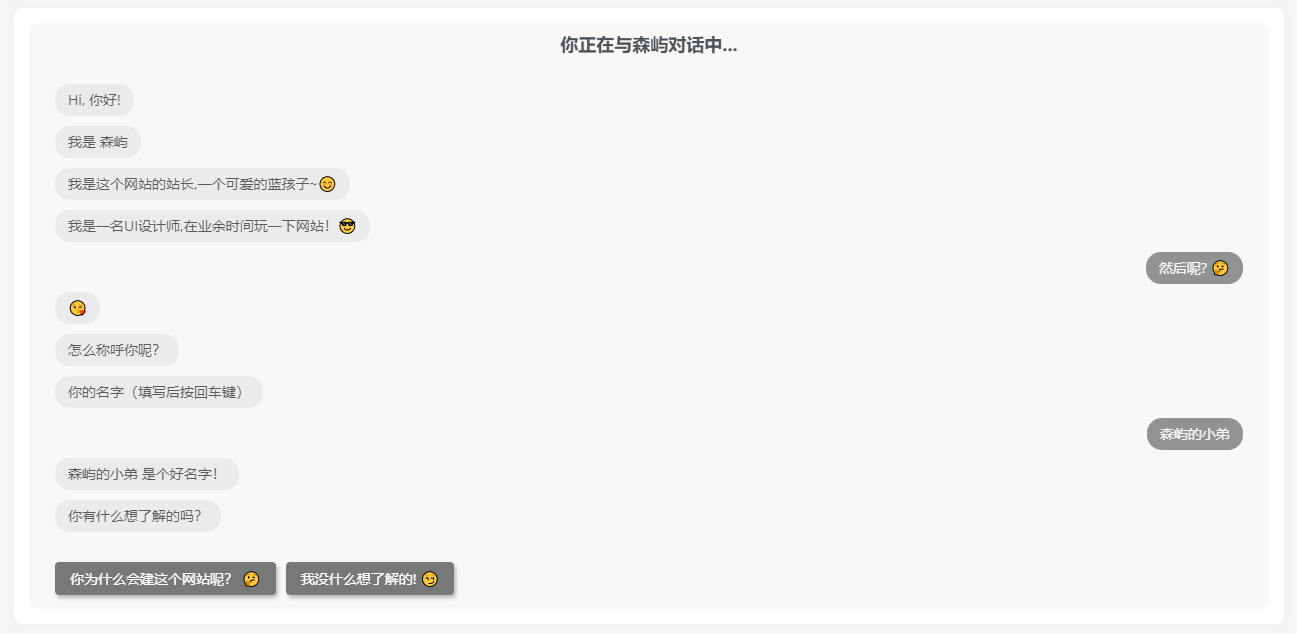
      <center><h4 style="font-weight: 700;">你正在与<a href="https://21lhz.cn">森屿</a>对话中...</h4></center>
      <bot-ui></bot-ui>
  </div>
</div>
<script type="text/javascript" src="../cdn/js/vue.min.js"></script>
<script type="text/javascript" src="../cdn/dist/botui.min.js"></script>
<script type="text/javascript">
  var homeBot = BotUI('home-demo');
  homeBot.message.add({
    content: 'Hi, 你好!?'
  }).then(function () {
    return homeBot.message.add({
      delay: 1500,
      content: '我是 森屿'
    });
  }).then(function () {
    return homeBot.message.add({
      delay: 1500,
      content: '我是这个网站的站长,一个可爱的蓝孩子~?'
    });
  }).then(function () {
    return homeBot.message.add({
      delay: 1500,
      content: '我是一名UI设计师,在业余时间玩一下网站!?'
    });
  }).then(function () {
    return homeBot.action.button({
      delay: 1000,
      action: [{
        text: ' 然后呢? ?',
        value: 'sure'
      }, {
        text: ' 少废话! ?',
        value: 'skip'
      }]
    });
  }).then(function (res) {
    if(res.value == 'sure') {
      tutorial();
    }
    if(res.value == 'skip') {
      end();
    }
  });

  var tutorial = function () {
    homeBot.message.add({
      delay: 1000,
      content: "?"
    }).then(function () {
      return homeBot.message.add({
        delay: 1000,
        content: '怎么称呼你呢?'
      });
    }).then(function () {
      return homeBot.message.add({
        delay: 1200,
        content: '你的名字(填写后按回车键)'
      });
    }).then(function () {
      return homeBot.action.text({
        delay: 800,
        action: {
          value: '森屿的小弟',
          placeholder: '填写你的名字'
        }
      });
    }).then(function (res) {
      return homeBot.message.bot({
        delay: 500,
        content: res.value + ' 是个好名字!'
      });
    }).then(function (res) {
      return homeBot.message.bot({
        delay: 1400,
        content:'你有什么想了解的吗?'
      });
    }).then(function () {
    return homeBot.action.button({
      delay: 1000,
      action: [{
        text: ' 你为什么会建这个网站呢? ?',
        value: 'sure'
      }, {
        text: ' 我没什么想了解的! ?',
        value: 'skip'
      }]
    });
  }).then(function (rea) {
    if(rea.value == 'sure') {
      tutorial2();
    }
    if(rea.value == 'skip') {
      end();
    }
  });};

  var tutorial2 = function () {
    homeBot.message.add({
      delay: 1000,
      content: '闲着无聊就想着拥有属于自己的网站,于是就创建“森巷鹿屿”,并且对代码格外感兴趣。'
    }).then(function () {
      return homeBot.message.bot({
        delay: 1000,
        content: '学习了一些前端语言、PHP等,现在正在学习C4D建模...'
      });
    }).then(function () {
      return homeBot.message.bot({
        delay: 1000,
        content: '非常喜欢折腾,热爱折腾,目前正在计算机一道上探索中。'
      });
    }).then(function () {
    return homeBot.action.button({
      delay: 1000,
      action: [{
        text: ' 为什么叫 森巷鹿屿 呢? ?',
        value: 'sure'
      }, {
        text: ' 好的!我知道了! ?',
        value: 'skip'
      }]
    });
  }).then(function (rea) {
    if(rea.value == 'sure') {
      tutorial3();
    }
    if(rea.value == 'skip') {
      end();
    }
  });};

  var tutorial3 = function () {
    homeBot.message.add({
      delay: 1000,
      content: 'emmm..玩游戏时用的游戏名称,觉得挺好听的,于是我就一直使用到现在!'
    }).then(function () {
    return homeBot.action.button({
      delay: 1000,
      action: [{
        text: '森屿这词是有什么含意吗?(ง •_•)ง',
        value: 'sure'
      }]
    });
  }).then(function (rea) {
    if(rea.value == 'sure') {
      tutorial4();
    }
  });};

   var tutorial4 = function () {
    homeBot.message.add({
      delay: 1000,
      content: '其实也没啥含意吧?就是觉得“森屿”这词给人一种很牛逼的感觉。'
    }).then(function () {
    return homeBot.action.button({
      delay: 1000,
      action: [{
        text: '你的网站采用什么进行搭建的?(╹ڡ╹ )',
        value: 'sure'
      }]
    });
    }).then(function (rea) {
    if(rea.value == 'sure') {
          tutorial5();
      }
    });};

    var tutorial5 = function () {
    homeBot.message.add({
      delay: 1000,
      content: '本站采用的是WordPress+子比主题来进行搭建与创作的。'
    }).then(function () {
      return homeBot.message.bot({
        delay: 1000,
        content: '最后非常感谢您光临本站,如果我的文章对您有所帮助的话,那么是我最大的荣幸 ?'
      });
    }).then(end);};

  var end = function () {
    homeBot.message.add({
      delay: 1000,
      content: '--------------------- 没有下文了哦 ---------------------'
    }).then(function () {
      return homeBot.message.bot({
        delay: 1000,
        content: '本站首页 <a href="https://www.liz0.top" style="color:#f00;">森巷鹿屿</a> 如果喜欢本站的话可以收藏一下哦!不喜欢的话也没关系,下次再喜欢吧!?'
      })
    });
  };
</script>
</div>
</main>
<?php
get_footer();
接下来就是css跟js了,已经打包好上传了,直接下载解压到根目录即可(你也可以解压到你喜欢的文件夹里,不过php里的css跟js引入路径记得修改)!
很多人都不喜欢默认的Typecho后台风格,本篇文章分享三款后台模板给大家,使用之前请做好备份,请勿与后台美化插件混用
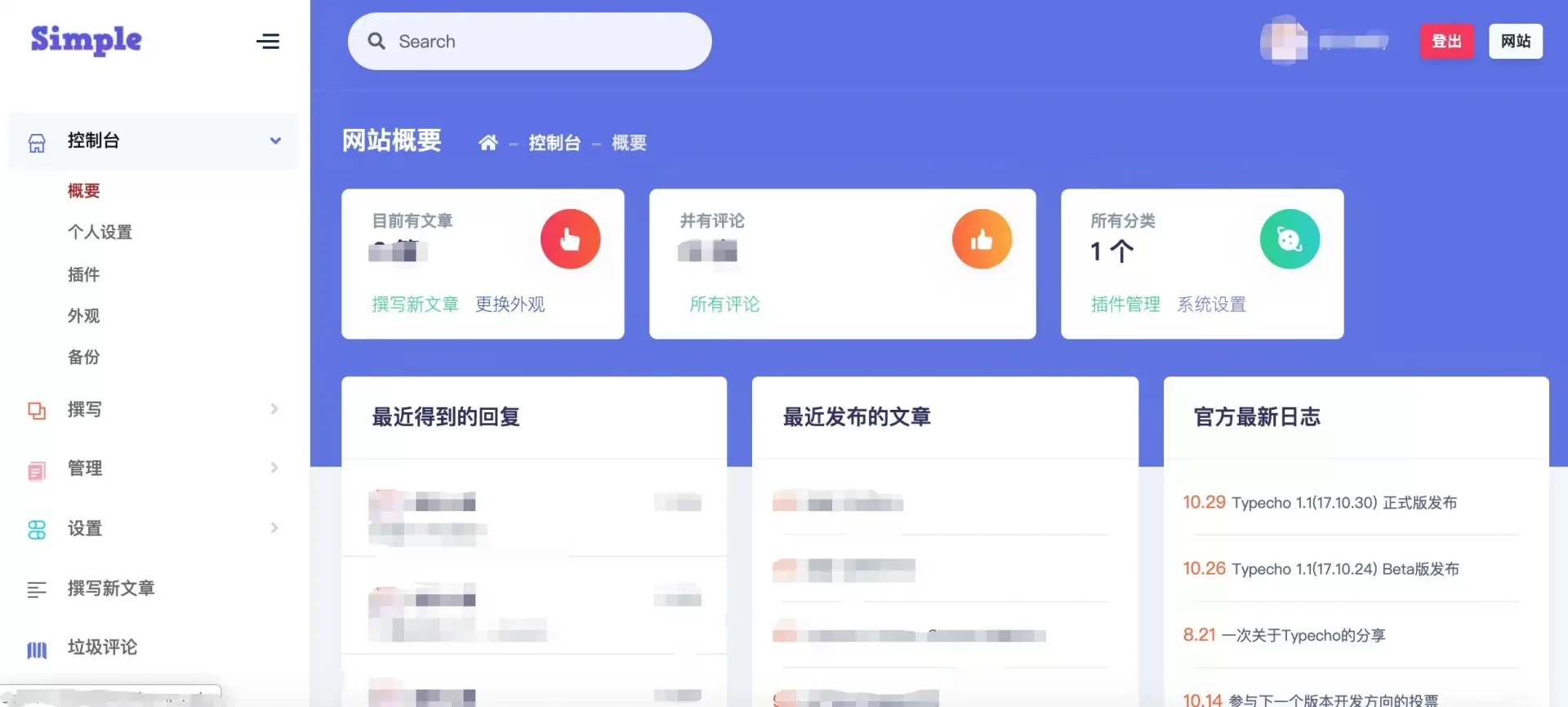
下载:https://wwu.lanzoum.com/iXXVH05t33lc
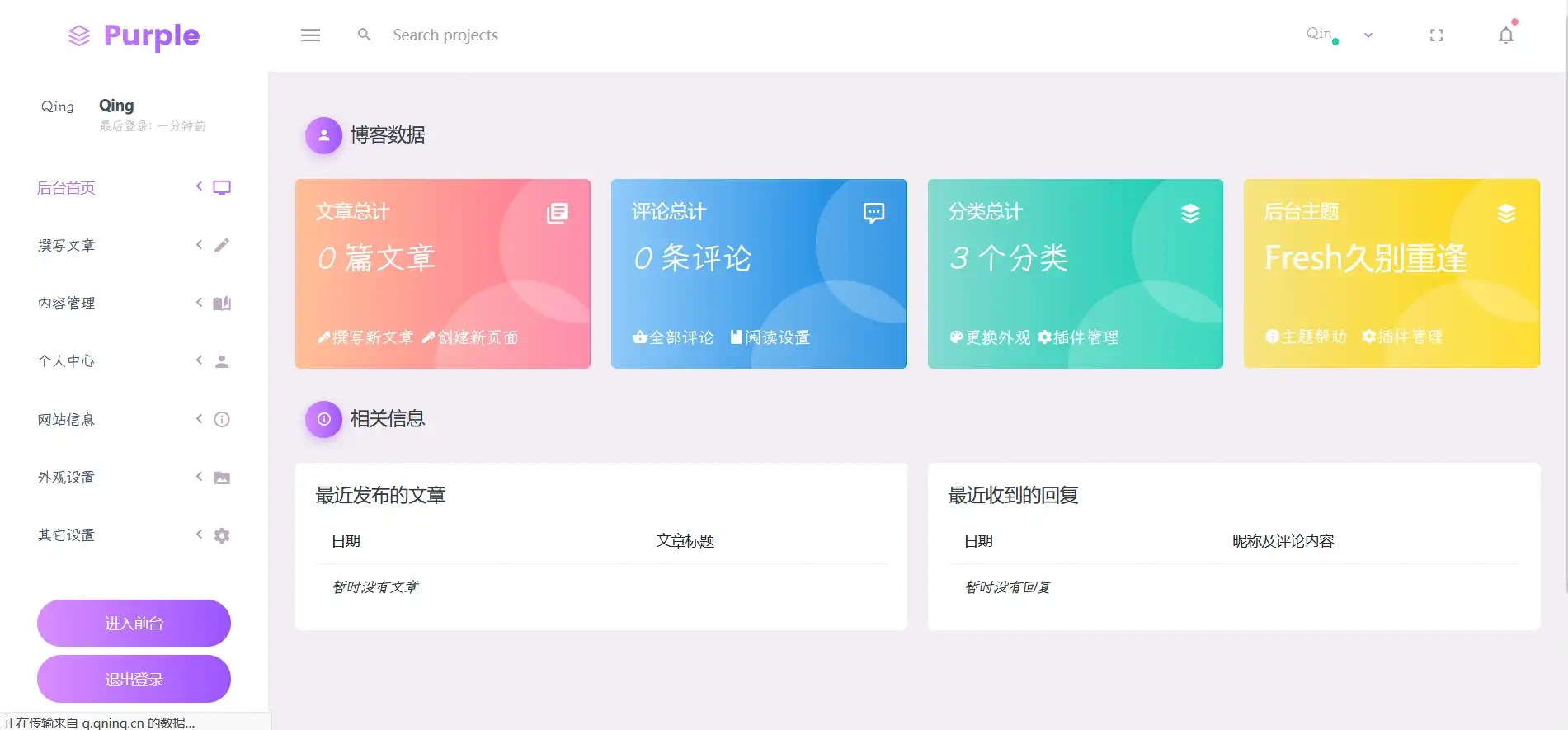
下载:https://wwu.lanzoum.com/ilUrv05t39if
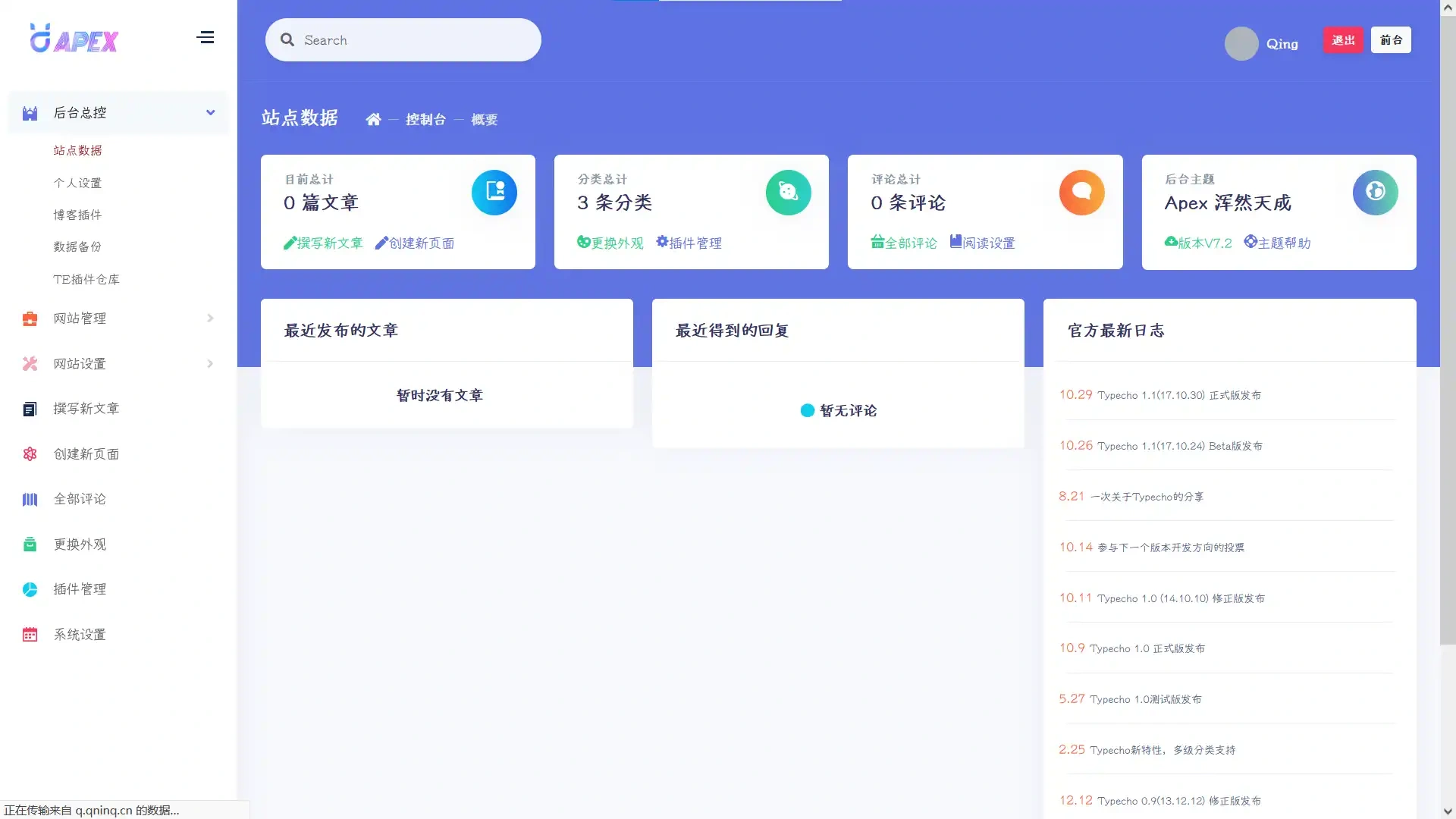
下载:https://wwu.lanzoum.com/iq0rj05t3f1e
网站根目录解压自动覆盖admin文件夹,然后将解压出的Menu.php复制到/var/Widget/即可。记得提前做好备份